



15 Best Free & Paid SEO Tools for Small Businesses

Key Takeaways
- Small businesses can compete in search by using data-driven tools instead of relying on instinct.
- Start with free Google platforms, then add paid tools only to fill real gaps in research, tracking, and optimization.
- Combine keyword research, content planning, and competitor insights to target realistic opportunities, not vanity keywords.
- Technical fixes matter: speed, crawlability, and stability can unlock rankings and improve conversions.
- Rank tracking and reporting turn SEO into a measurable process, helping you prioritize what actually moves results.
- Keep your toolkit lean, use it consistently, and scale up only when your workflow and goals demand it.
Small businesses compete for visibility in search results where larger brands often dominate by default. Limited budgets, small teams, and time constraints make it difficult to know which SEO efforts actually deserve attention. As a result, many owners either spread themselves too thin or avoid SEO altogether, assuming it is too technical or costly to manage in-house. That hesitation usually costs more in the long run than the tools themselves.
The right SEO tools change that equation. Instead of relying on assumptions, businesses can work with clear data showing how people search, which pages perform well, and where technical issues quietly limit growth. Modern platforms help uncover quick wins, track progress over time, and prioritize fixes that have real impact. You don’t need a large marketing department to benefit from these insights. What matters is consistency and a focused approach.
By combining a few best SEO tools for small business with free data from Google, small teams can build a practical toolkit that supports smarter decisions. These tools help reduce wasted effort, highlight realistic opportunities, and create a clear roadmap for improvement. This guide breaks down 15 carefully selected tools and the strategy around them, helping small businesses compete more effectively without burning time or budget.
Why Small Businesses Need SEO Tools More Than Ever
Small businesses rarely get second chances online. If your site doesn’t load quickly, answer questions clearly, or show up where your customers are searching, they move on to a competitor without thinking twice. SEO tools help avoid that silent leak of opportunity by turning vague “visibility issues” into specific, solvable problems. You can see which pages attract traffic, which keywords matter, and where you’re losing potential customers.
Relying on instinct alone usually leads to wasted effort. With the right tools in place, you can identify content gaps, monitor rankings over time, and decide whether to update or retire underperforming pages. Adding keyword research tools for small businesses, supported by a solid foundation like SEO keyword research, makes it easier to choose terms you can realistically rank for rather than chasing unreachable goals. In a landscape where algorithms and user expectations constantly shift, a data-backed toolkit is no longer optional; it’s the only way to make SEO work at a small-business pace and budget.
The Reality of Competing Against Bigger Companies Online
Larger companies have advantages you can’t ignore: established brands, strong link profiles, and big marketing teams. Their content appears everywhere, and they can afford to test multiple strategies at once. That doesn’t mean small businesses are locked out, but it does mean you have to be smarter with where you focus. You don’t need to win every keyword; you need to win the ones that matter most to your audience.
Without tools, it’s easy to underestimate just how strong those competitors are. A quick look at their authority, content volume, and link profile tells you whether a topic is worth pursuing or better avoided. This is where technical SEO audit tools and research platforms become essential. They show you where large competitors are vulnerable; maybe they ignore long-tail phrases, don’t cover certain locations deeply, or have slower pages on mobile. You can’t outspend them, but you can out-position them on specific, carefully chosen opportunities.
How SEO Tools Level the Playing Field
The main advantage tools give small businesses is efficiency. Instead of spending hours manually checking rankings, copying data into spreadsheets, or guessing why traffic dropped, you can log into a dashboard and see the story at a glance. Over time, patterns emerge: which updates helped, which pages keep slipping, which topics keep growing.
Well-chosen tools also:
- Highlight content opportunities your competitors haven’t fully covered yet
- Reveal pages that need better internal links or clearer structure
- Flag technical problems before they become ranking killers
When you combine that with rank tracking tools for small business, you can connect your day-to-day work with real outcomes. You stop operating in the dark. Even if you only have a few hours per week for SEO, those hours become focused on what moves the needle instead of what feels important.
Common SEO Mistakes Small Businesses Make Without Proper Tools
When businesses try to “wing it” with SEO, the same problems keep arising. They choose keywords that sound good but are far too competitive, publish content no one searches for, or ignore slow pages that quietly drive visitors away. Without clear reporting, it’s almost impossible to know what’s working and what isn’t.
A few typical mistakes include:
- Targeting broad, generic phrases instead of specific, intent-driven terms
- Publishing thin pages that never build topical authority
- Neglecting mobile performance and user experience signals
Ignoring location data is another hidden issue. Without local SEO tools for small business, teams often miss how differently people search by city, region, or neighborhood. Tools help you see these patterns clearly, stop investing in dead ends, and fix the technical and content gaps that hold you back.
Free SEO Tools That Deliver Professional Results
Free tools are often enough to build a solid SEO foundation, especially when you’re just starting or operating on a strict budget. Many of the most reliable insights come directly from Google’s own platforms, which means the data you see reflects how your site actually performs in search. You’re not working with guesswork or third-party estimates; you’re seeing real queries and real behavior.
Combining Google’s tools with a few community-driven platforms gives you coverage across research, performance, and technical health. You can diagnose slow templates, find content opportunities, and understand how people move across your pages. Even before investing in paid solutions, this stack can reveal where you need help most. From there, you can choose the best SEO tools for small business that complement what free data already shows, instead of paying for features you’ll never use.
Google’s Free SEO Arsenal
Tool 1: Google Search Console – Setting Up and Navigating for Beginners
Google Search Console is where you see how Google itself interprets your site. It shows which queries bring impressions and clicks, which pages are indexed, and where errors block visibility. You can track changes over time, see which URLs drop, and identify coverage issues after new deployments.
For a small business, this is non-negotiable. It tells you:
- Which pages attract search traffic today
- Where mobile usability or security problems appear
- Whether your structured data is being picked up
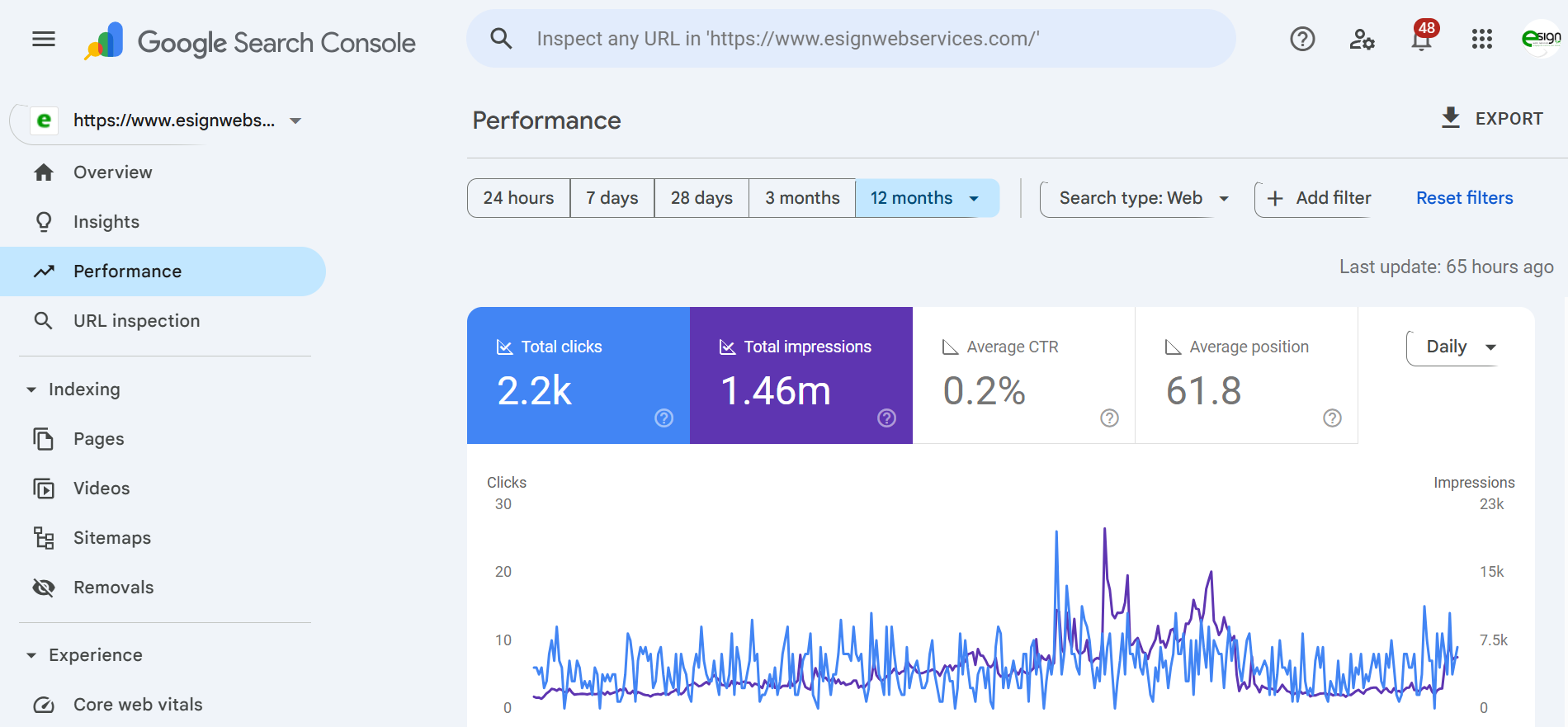
When paired with SEO reporting tools, Search Console helps you explain performance clearly to stakeholders or clients. You don’t need to be technical to extract value either. Even basic checks, like monitoring the Performance and Pages reports, can uncover misalignments between what you publish and what users actually find. Even this default Performance view, showing total clicks, impressions, CTR, and average position, already tells you which pages and queries deserve attention.
Tool 2: Google Analytics 4 – Essential Reports for SEO Tracking
Google Analytics 4 focuses on how users actually behave once they arrive on your site, which makes it a strong complement to search-centric data. Instead of just counting visits, GA4 shows how organic users move through pages, how long they stay engaged, and which actions signal real value. This shift helps small businesses separate traffic that looks good on paper from traffic that genuinely supports business goals.
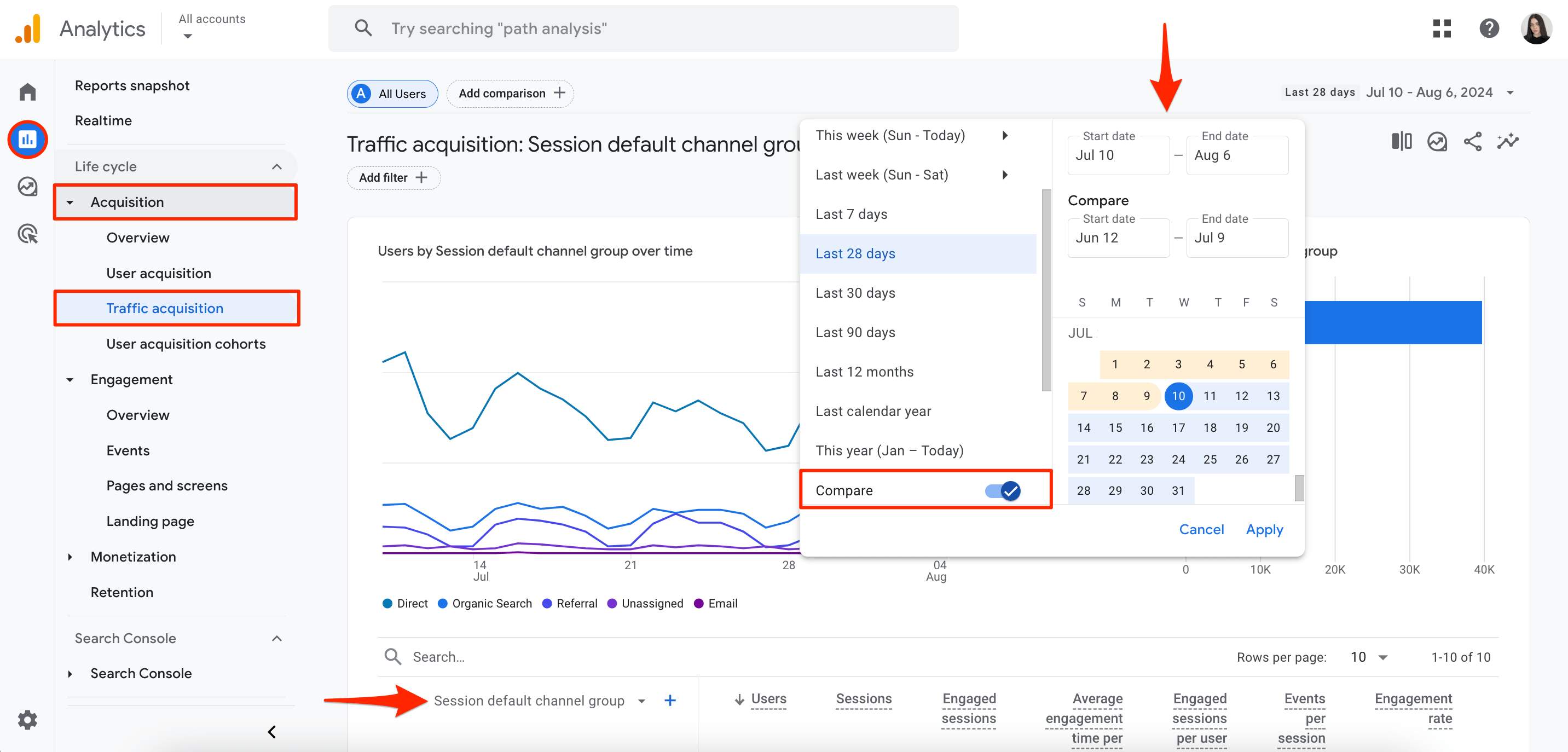
GA4 becomes more actionable when paired with structured dashboards built through SEO reporting tools or Looker Studio. These setups allow you to isolate organic sessions, compare landing page performance, and evaluate how content or technical changes affect engagement over time. Rather than tracking dozens of metrics, small teams benefit from answering a few focused questions: Which pages attract the most engaged users? Where do visitors abandon the journey? Which traffic sources contribute to leads or revenue? Used this way, GA4 turns raw analytics into practical insight, guiding decisions about what to improve, expand, or retire within your SEO strategy.
Tool 3: Google Keyword Planner – Keyword Research and Search Volume Data
Keyword Planner continues to provide reliable insight into search demand and competitive intensity, even though it sits inside the Google Ads interface. For organic SEO planning, it works well as an early validation tool when you need to understand how often topics are searched and how interest changes over time. You can explore related terms, apply location filters, and identify seasonal patterns that influence content timing. These signals help small businesses avoid publishing content in a vacuum.
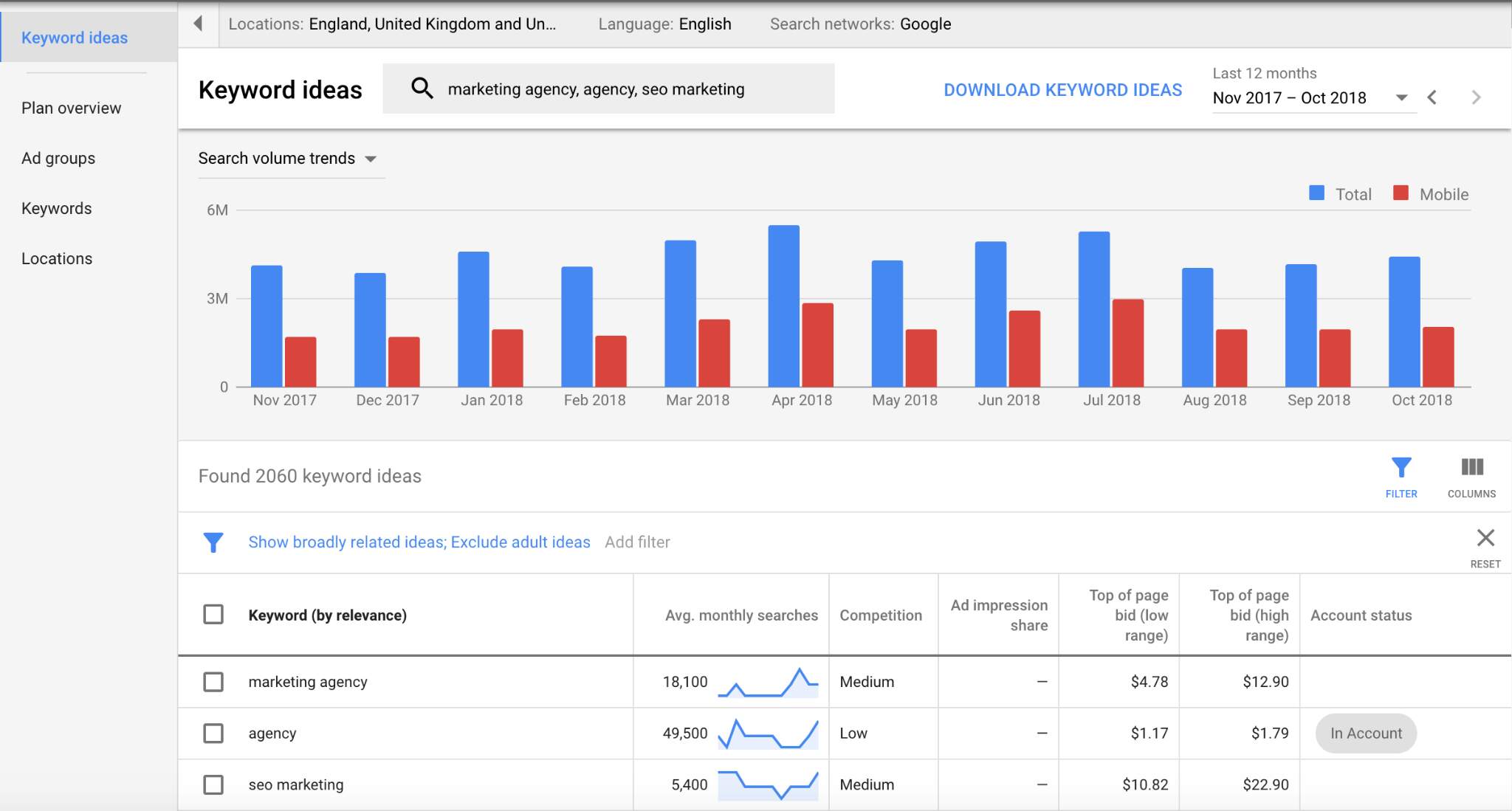
When paired with keyword research tools for small business, Keyword Planner becomes more strategic. Instead of chasing high-volume phrases that established brands already dominate, it helps confirm which terms are realistic targets. The most useful insights often come from lower-volume keywords with clearer intent, where focused content can meet specific needs. Even without running paid campaigns, the default view—trend graphs alongside keyword ideas with average monthly searches and competition levels—offers enough context to make informed decisions. Used consistently, Keyword Planner gives small teams a grounded view of how people actually search within their market and which topics are worth prioritizing before investing time and resources into content creation.
Community-Driven and Open-Source Solutions
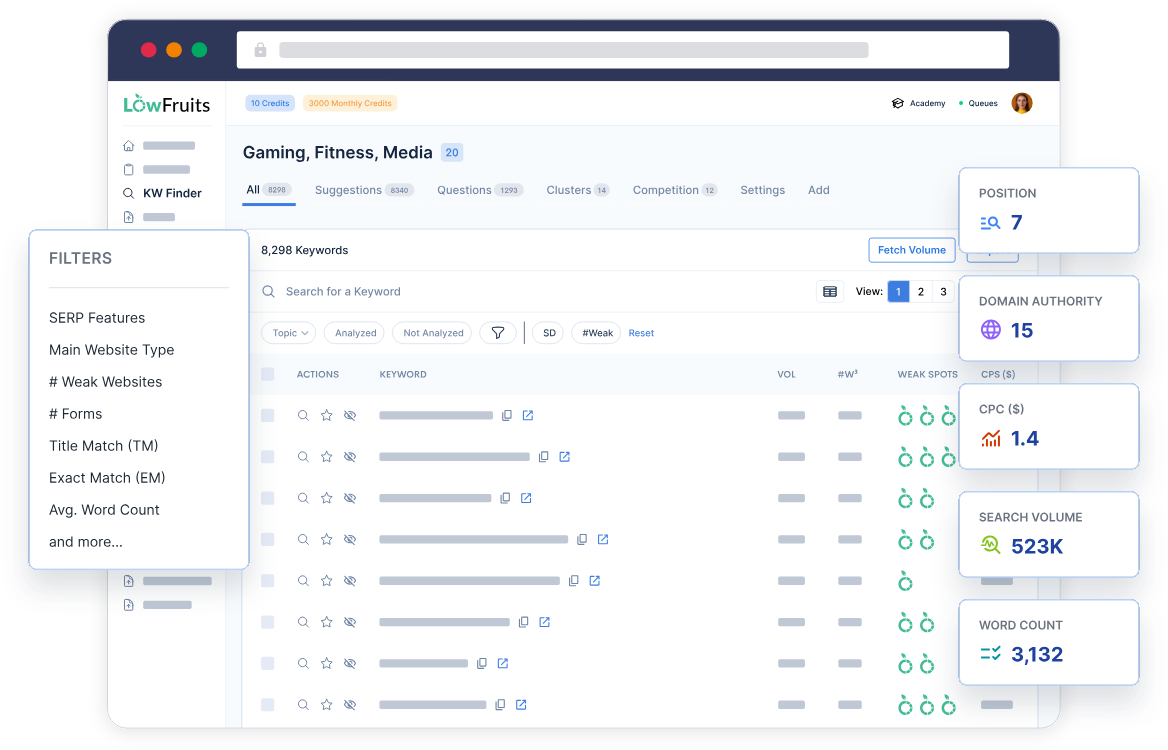
Tool 4: LowFruits (Free Tier) – Identifying Weak SERPs and Easy Opportunities
LowFruits is built around a simple but effective idea: identify weak spots in search results where smaller sites have a realistic chance to compete. Instead of focusing only on keyword volume, it analyzes live SERPs and highlights results dominated by forums, low-authority domains, or thin content. This makes it easier to spot keywords that may look competitive on paper but are actually achievable. The free tier provides limited searches, yet it’s often enough to uncover early content opportunities and validate ideas before investing more time.
For small teams with limited resources, this approach helps prioritize effort and avoid chasing keywords already controlled by major brands. Rather than targeting the same broad phrases everyone else pursues, you can build a content plan around terms where your pages can gain traction faster. When combined with keyword research tools for small business, LowFruits offers a more balanced view of opportunity by pairing difficulty insights with demand data. It’s especially useful during the early stages of building topical clusters, helping teams decide where to start and how to expand coverage logically without overcommitting resources.
Tool 5: AlsoAsked – Content Ideas and Question-Based Keywords
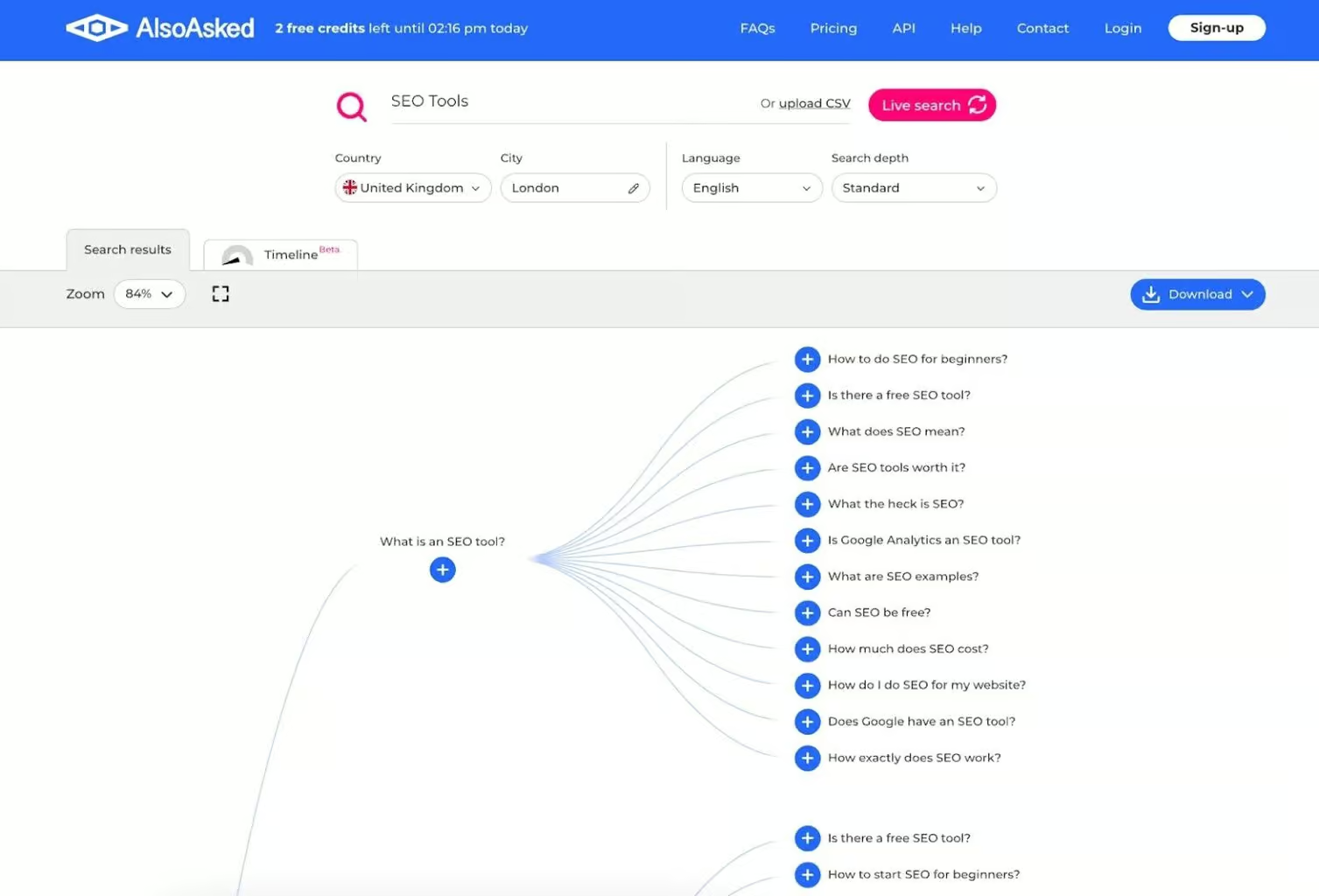
AlsoAsked transforms Google’s “People Also Ask” data into visual maps that show how questions connect and evolve around a core topic. Instead of guessing what to cover next, you can see how searchers naturally move from one question to another and which follow-ups they expect answers to. This makes it especially useful for planning blog posts, FAQs, and supporting sections that feel complete rather than fragmented.
The tool fits naturally into a content workflow where you already rely on best SEO tools for small business to evaluate volume and competition. While those platforms help you decide which topics are worth targeting, AlsoAsked helps shape how those topics should be structured. It reveals the conversational paths users follow, allowing you to build outlines that reflect real search behavior. Content created this way tends to align more closely with user intent, answer questions in the right order, and keep readers engaged longer. For small teams focused on depth rather than sheer volume, AlsoAsked adds an important layer of context that pure keyword metrics often miss.
Tool 6: Google PageSpeed Insights – Website Speed Optimization Analysis
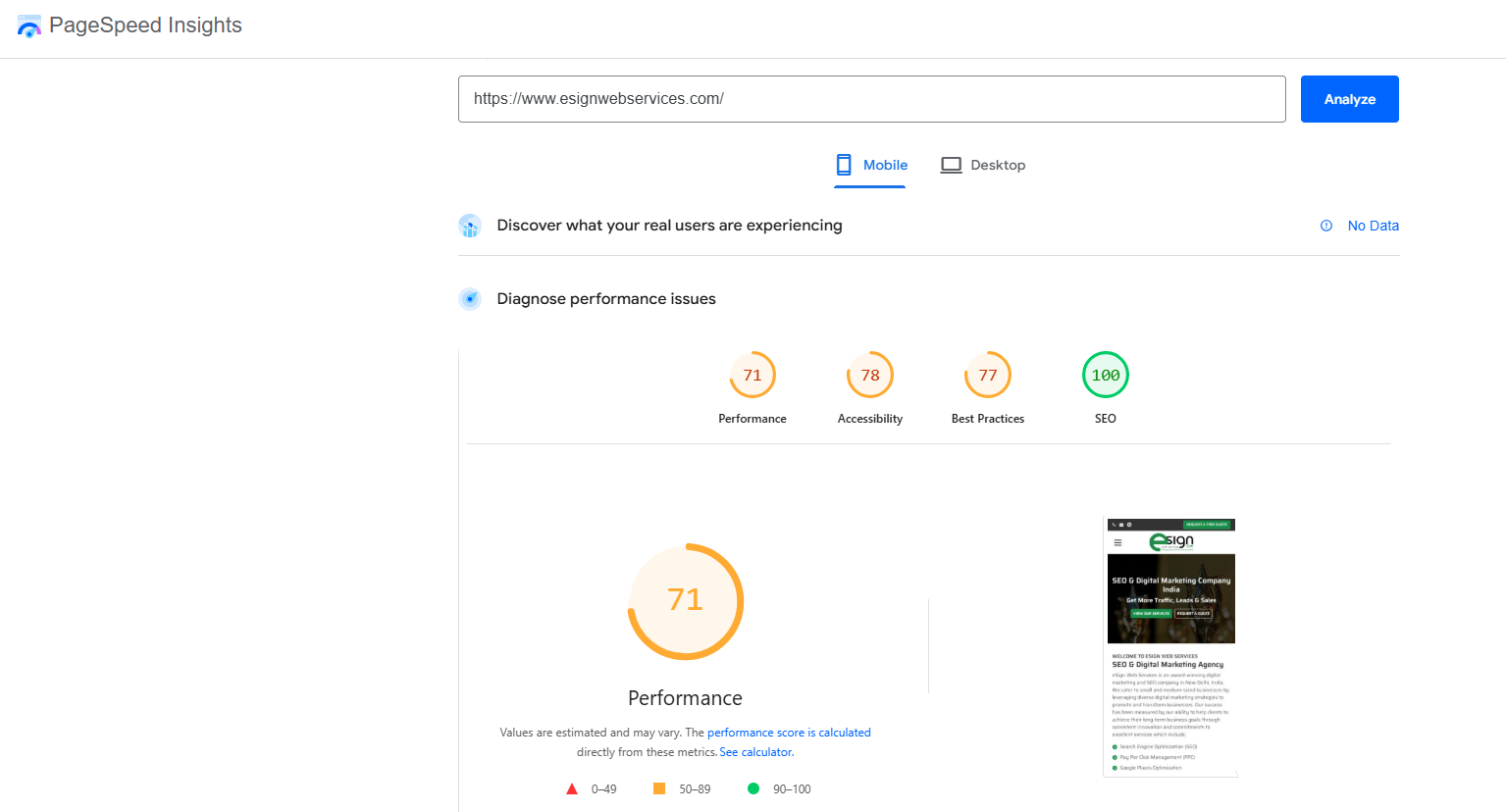
PageSpeed Insights evaluates how quickly your pages load and how stable they feel as users interact with them. Instead of relying on vague performance scores, it breaks site speed into specific metrics and connects them directly to Core Web Vitals, which Google uses as part of its ranking framework. Pages that load slowly or shift unexpectedly during scrolling don’t just frustrate users—they also weaken trust signals that influence visibility in search results.
For small businesses, the reports may seem technical at first, but the real value lies in the actionable recommendations. PageSpeed Insights clearly points out issues such as unoptimized images, render-blocking scripts, inefficient caching, and unused code. These suggestions help teams focus on changes that deliver measurable gains rather than cosmetic tweaks. When these insights are paired with deeper diagnostics from technical SEO audit tools, you get both a high-level performance snapshot and a clear roadmap for development work. Even modest improvements in load time and stability can lower bounce rates, improve engagement, and increase conversions, making site speed one of the most cost-effective optimization areas to address.
Browser Extensions for Quick SEO Analysis
Tool 7: MozBar – On-Page SEO Analysis and Domain Authority Checking
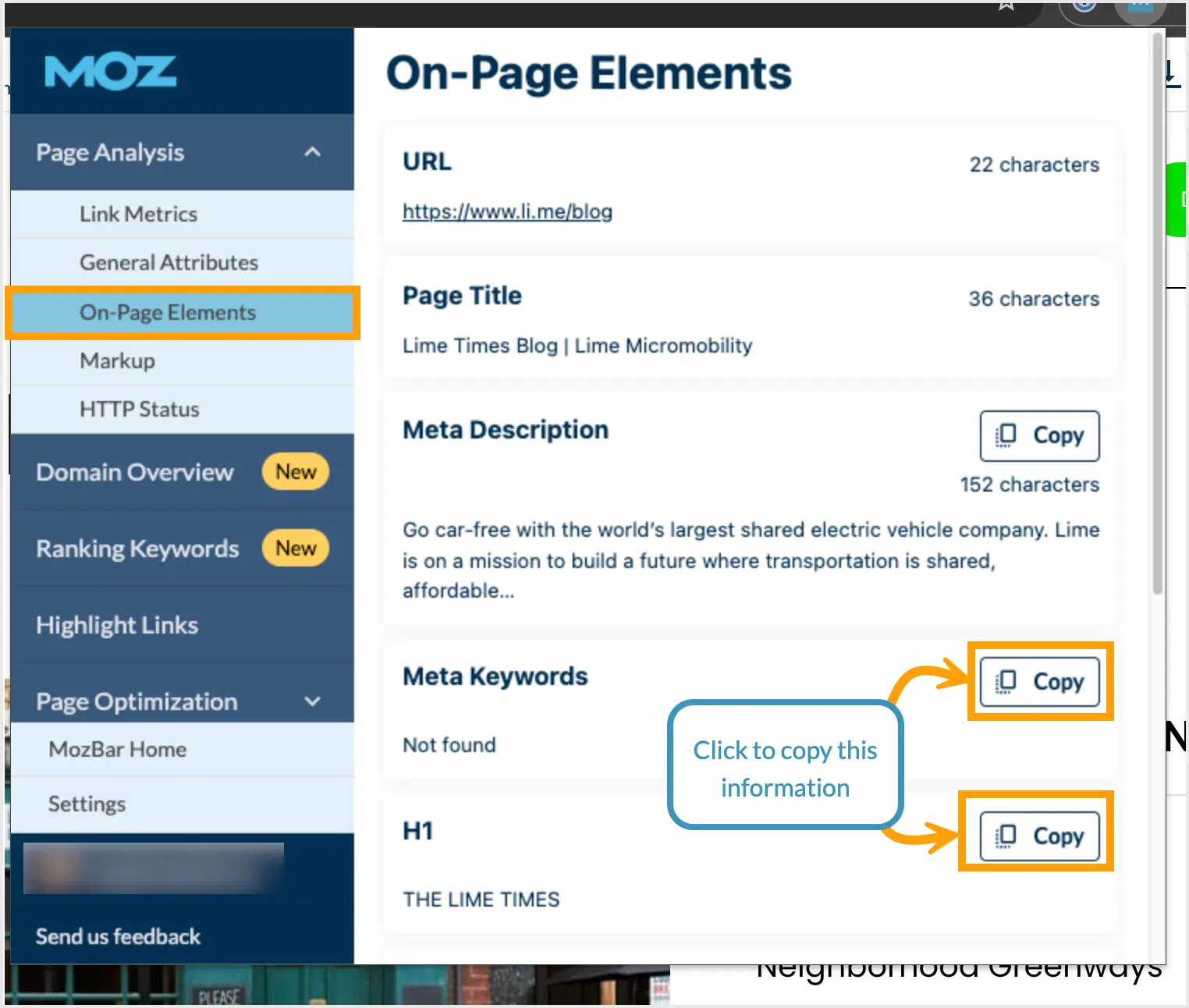
MozBar places key SEO metrics directly inside search results and live pages, allowing you to evaluate competition without switching tools. As you browse, you can see domain authority, page authority, and basic link data, which makes it easier to judge how difficult a keyword may be to rank for. This quick visibility helps small teams avoid wasting time on terms dominated by powerful domains.
When paired with keyword research tools for small business, MozBar adds an important layer of context. A keyword might show strong search volume, but MozBar reveals whether high-authority brands or more accessible competitors control the top results. That insight often determines whether you pursue a term directly or adjust your content angle. The extension also allows you to inspect on-page elements such as titles, headings, metadata, and internal links. This makes it easier to benchmark your own pages against what already performs well in your niche and identify gaps you can realistically improve.

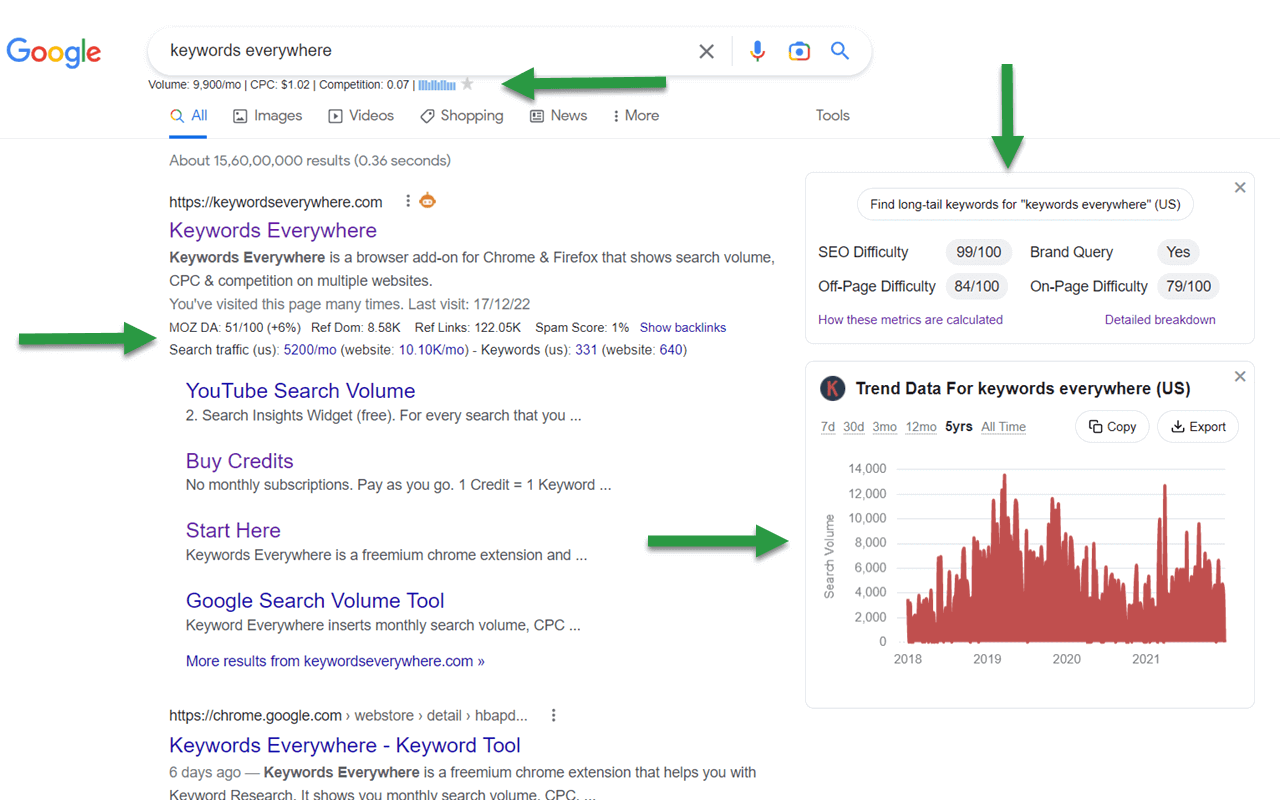
Tool 8: Keywords Everywhere – Search Volume and Competition Data
Keywords Everywhere brings essential keyword metrics—search volume, competition, and related terms—directly into your browser. Instead of switching between dashboards, you see this data alongside results in Google, YouTube, and other platforms as you search. That immediacy makes early research faster and more intuitive, especially during brainstorming or topic validation.
For local or niche-focused companies using local SEO tools for small business, this extension helps refine wording and understand how real users phrase their searches. Small variations in language can significantly affect intent, and seeing those differences in context helps teams choose more accurate terms. Keywords Everywhere also allows you to export keyword lists for later sorting, clustering, or deeper analysis in other tools. While it’s not designed to replace full SEO platforms, it excels at quick checks and on-the-fly validation. Used consistently, it reduces friction in the research process and supports smarter decisions without slowing you down or overcomplicating your workflow.
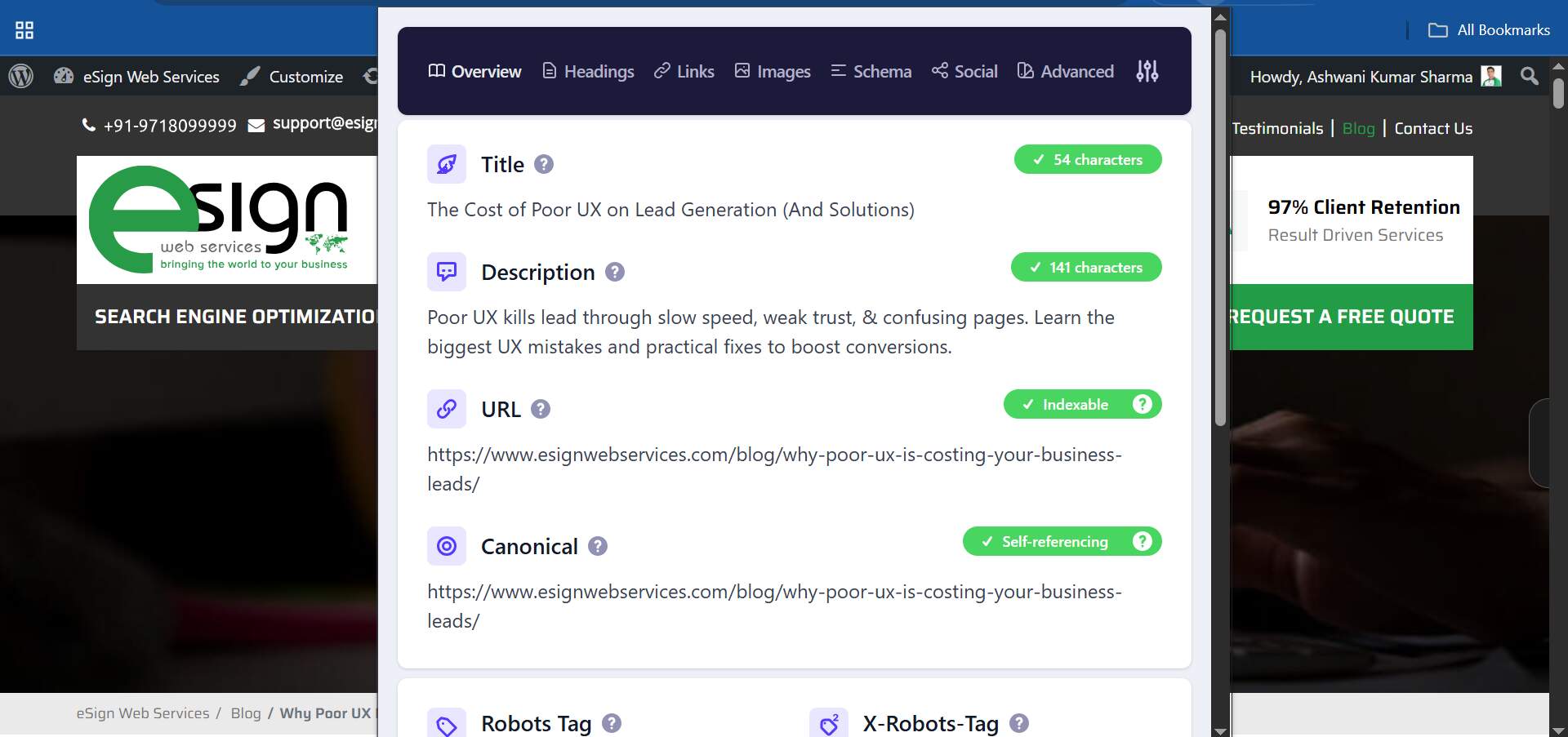
Tool 9: Detailed SEO Extension – Technical SEO Audits and SERP Insights
The Detailed SEO Extension allows you to inspect critical on-page elements with a single click, without digging into source code or developer tools. It surfaces title tags, meta descriptions, heading structure, canonical tags, indexation signals, and structured data in a clear, readable format. This makes it especially useful when reviewing your own pages or quickly analyzing why certain competitors perform well in search results.
When used alongside more comprehensive technical SEO audit tools, the extension works as a reliable spot-check during routine content updates. You can quickly confirm that metadata hasn’t been overwritten, canonicals point correctly, and key SEO elements remain intact after edits or migrations. It also serves as a practical training aid for non-technical team members, helping them identify common issues before content goes live. By catching small mistakes early, teams reduce the risk of publishing errors that quietly undermine visibility. For day-to-day SEO hygiene and fast competitive reviews, the Detailed SEO Extension delivers clarity without adding complexity to your workflow.
Budget-Friendly Paid Tools Under $50 Per Month
Paid tools under $50 per month hit a sweet spot for small businesses. They’re powerful enough to provide richer data and automation but still affordable enough to justify on a tight budget. The goal here isn’t to subscribe to everything; it’s to select tools that complement your free stack and fill the biggest gaps.
Typically, those gaps sit in three areas:
- Deeper keyword research and intent analysis
- Ongoing rank tracking with reliable local data
- Smarter content optimization based on SERP comparisons
When you combine one or two of these platforms with best SEO tools for small business already in use, you move beyond basic visibility and into consistent, strategic improvement. The following tools are strong candidates for that first upgrade.
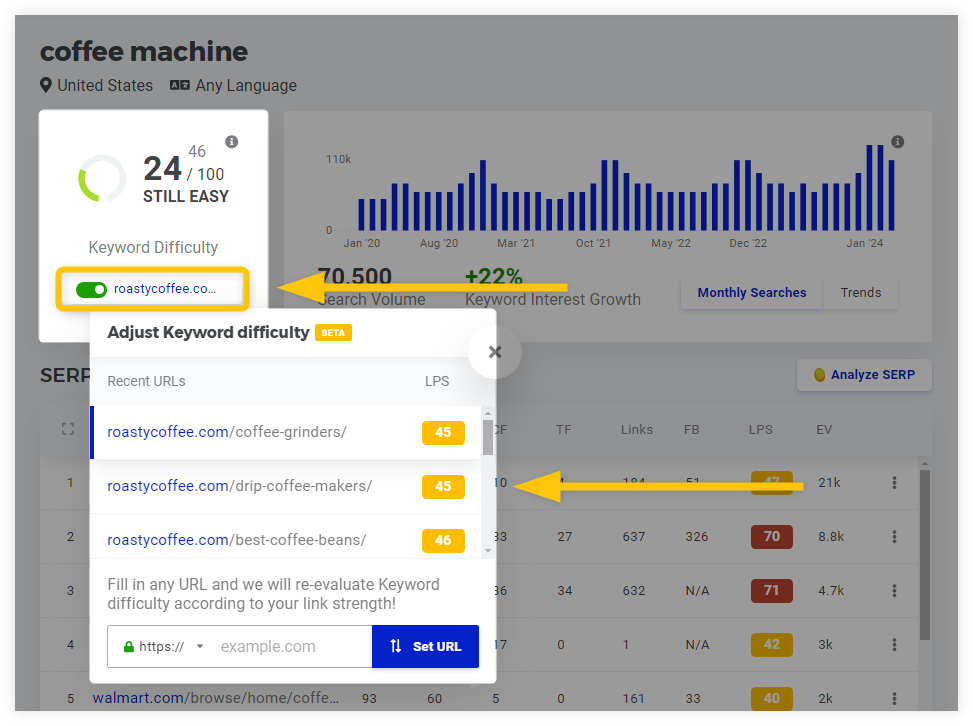
Tool 10: KWFinder – User-Friendly Interface and Accurate Difficulty Scores
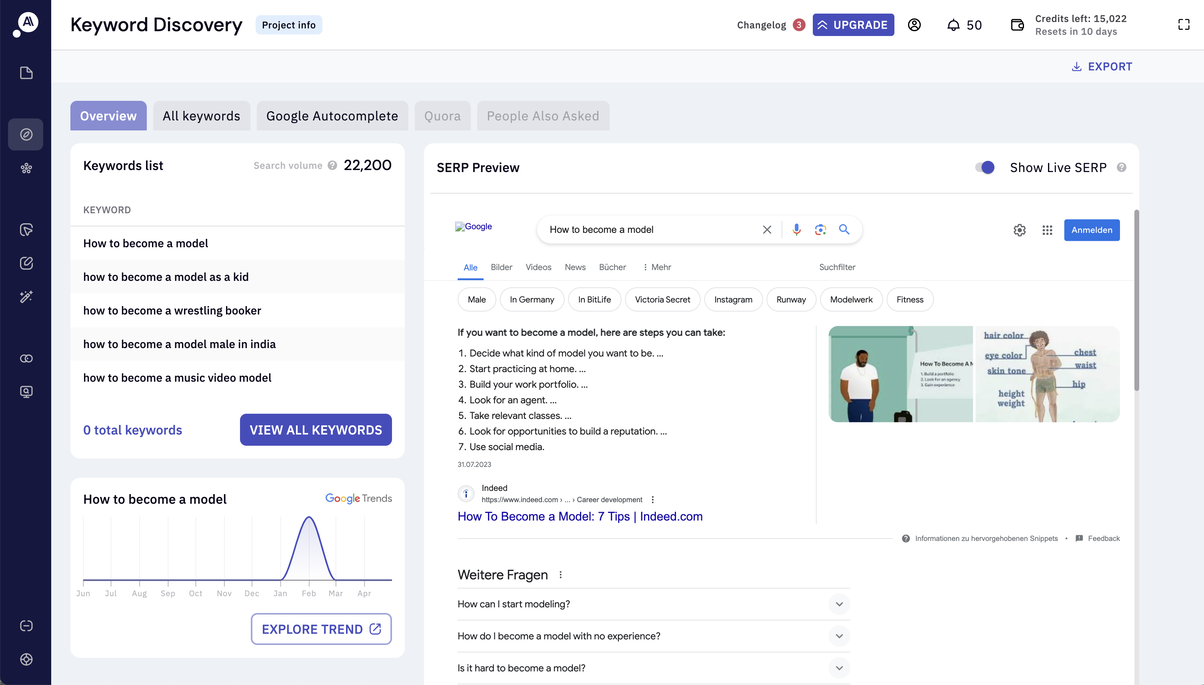
KWFinder is built for ease of use, making it accessible from the moment you open it. You start by entering a seed keyword, apply filters for country or language, and immediately see search volume, keyword difficulty, and SERP snapshots in one clean view. This layout helps teams quickly understand which terms are realistically within reach and which are dominated by larger, more established brands.
For businesses already working with keyword research tools for small business, KWFinder adds an extra layer of precision. Its difficulty scores are generally well balanced, particularly for long-tail keywords where small sites often find their best opportunities. The tool also allows users to organize keywords into lists by project or theme, which supports long-term planning and topical clustering. Because the interface is intuitive and visually clear, content writers and marketers can use it directly without constant guidance from SEO specialists. That accessibility makes KWFinder a practical choice for teams that want reliable research without unnecessary complexity.
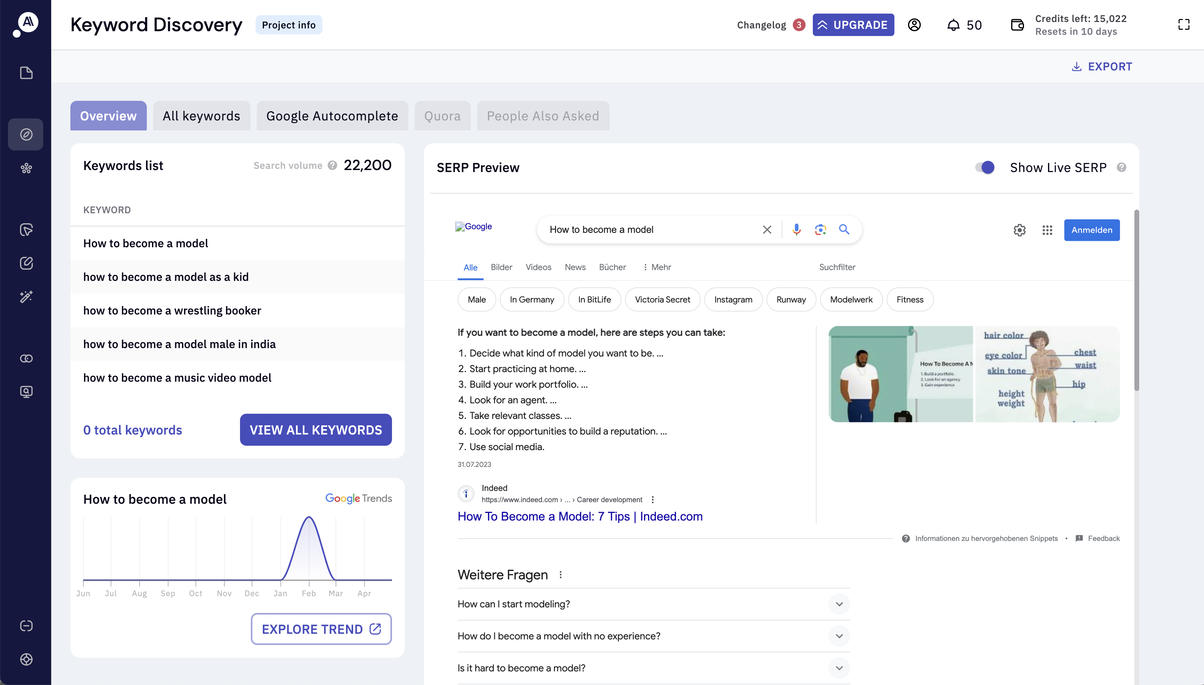
Tool 11: KeywordInsights.ai – Keyword Clustering and Intent Analysis
KeywordInsights.ai removes much of the manual effort involved in keyword clustering. Rather than sorting hundreds of terms by hand, you upload a keyword list and let the platform group them based on live SERP overlap. This approach reflects how Google actually interprets similarity, making it easier to decide how many pages you need and which keywords should live together within a single piece of content.
When integrated into a stack that already includes best SEO tools for small business, KeywordInsights.ai plays a strategic role in aligning content with search intent. It clearly labels clusters as informational, transactional, or mixed, reducing the risk of creating pages that don’t match what users expect. Writing a blog post for a query that signals purchase intent—or building a product page for informational searches—often leads to poor performance. By clarifying intent early, the tool helps prevent wasted effort and keeps your content map focused, structured, and consistent as it scales.
Tool 12: Mangools Suite – KWFinder, SERPChecker, SERPWatcher, LinkMiner Overview
Mangools brings multiple SEO functions together under one subscription, making it a strong all-in-one option without the complexity of enterprise platforms. KWFinder supports keyword discovery, SERPChecker evaluates the strength of ranking pages, SERPWatcher monitors position changes over time, and LinkMiner focuses on link opportunities. Together, these tools cover the core tasks most small teams need without forcing them to manage several separate logins.
For teams responsible for both strategy and execution, having everything in one place reduces friction and saves time. SERPWatcher, in particular, works well alongside existing rank tracking tools for small business, offering a clear visual timeline that shows gains, drops, and overall trends without overwhelming detail. Mangools also stands out for its accessibility. Each module has a clean interface and a gentle learning curve, which makes onboarding new team members straightforward. Rather than spending weeks learning a complex system, users can start extracting value quickly, making Mangools a practical choice for growing businesses that need reliable insights without added complexity.
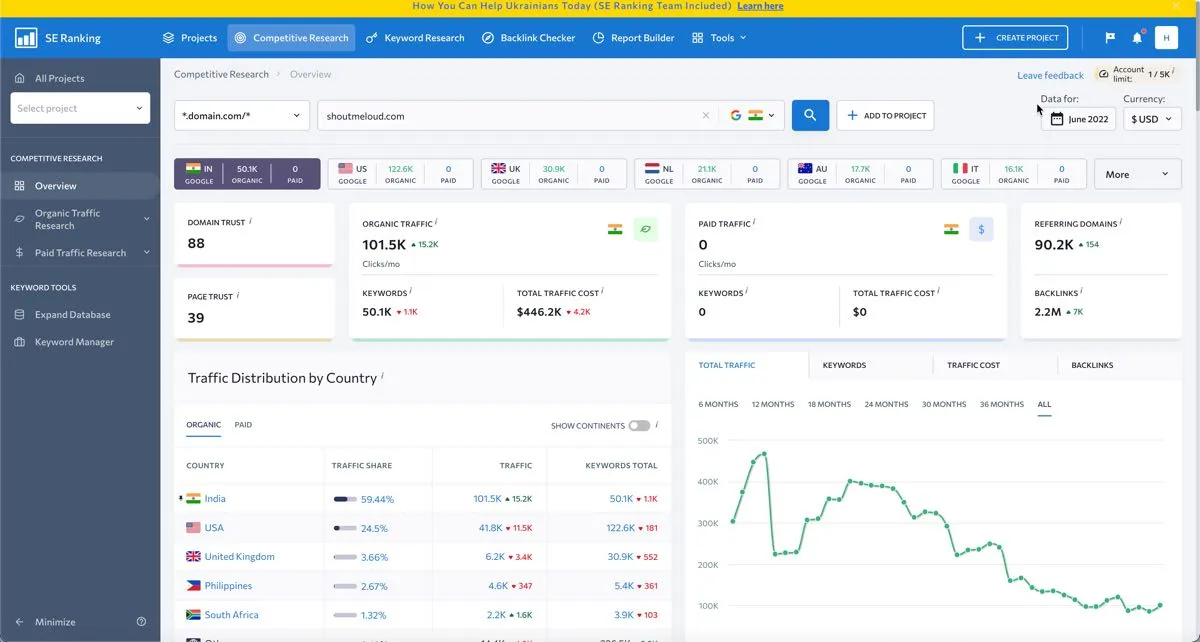
Tool 13: SE Ranking – Comprehensive Features at Competitive Pricing
SE Ranking is often positioned as a platform that delivers most of the functionality of enterprise SEO tools at a much lower cost. It combines rank tracking, site audits, backlink monitoring, and competitive research into a single, streamlined environment. This makes it appealing for small businesses and agencies that need robust features without locking into expensive, long-term contracts.
For teams already working with local SEO tools for small business, SE Ranking’s local tracking capabilities add meaningful value. You can monitor rankings across specific cities or ZIP codes, compare map results, and spot visibility changes that impact real-world traffic. These insights make it easier to refine local targeting and adjust campaigns based on actual performance. The platform’s reporting features also support clearer communication, allowing teams to share progress with clients or internal stakeholders in a format that highlights trends and outcomes. By combining affordability with breadth, SE Ranking offers a practical step up for businesses ready to manage SEO more systematically.
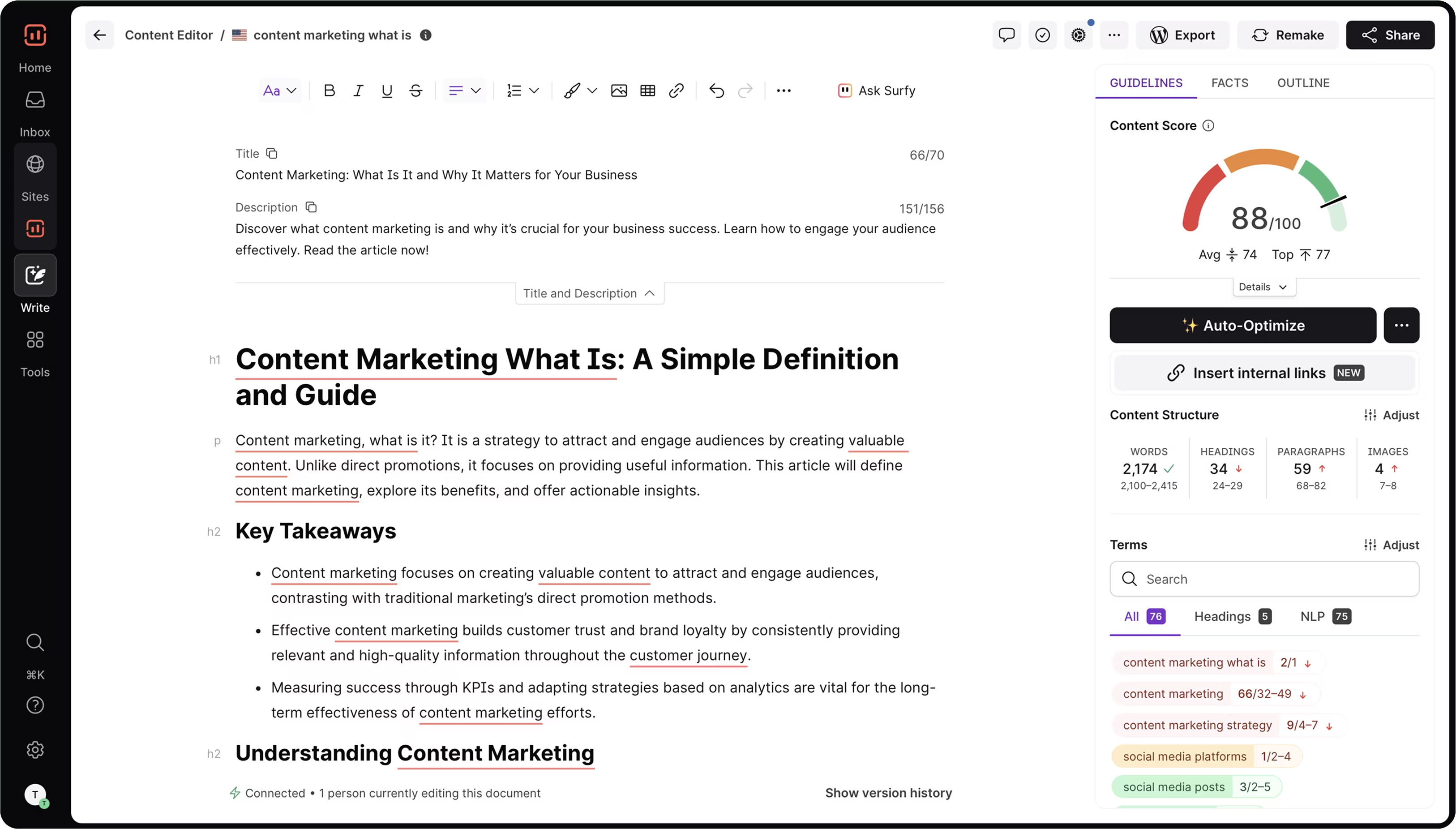
Tool 14: Surfer SEO – Content Editor and SERP Analysis Features
Surfer SEO centers on a single, useful question: how closely does your page align with what already performs well in search results? It analyzes top-ranking pages on a given SERP and distills shared patterns into clear content guidelines. These include suggested word count ranges, heading structure, and relevant semantic terms that frequently appear across successful competitors. The goal isn’t to copy existing content, but to understand the baseline expectations Google appears to reward for that topic.
When used alongside SEO reporting tools, Surfer SEO helps connect content optimization directly to performance outcomes. Teams can refine pages stuck near the bottom of page one or top of page two, focusing on gaps that may be holding them back. It’s equally useful during content creation, allowing writers to check competitiveness before publishing rather than reacting after rankings stall. The real-time content editor stands out here, offering data-driven feedback as drafts take shape. For small teams producing content regularly, this reduces revision cycles and keeps optimization aligned with measurable search visibility goals.
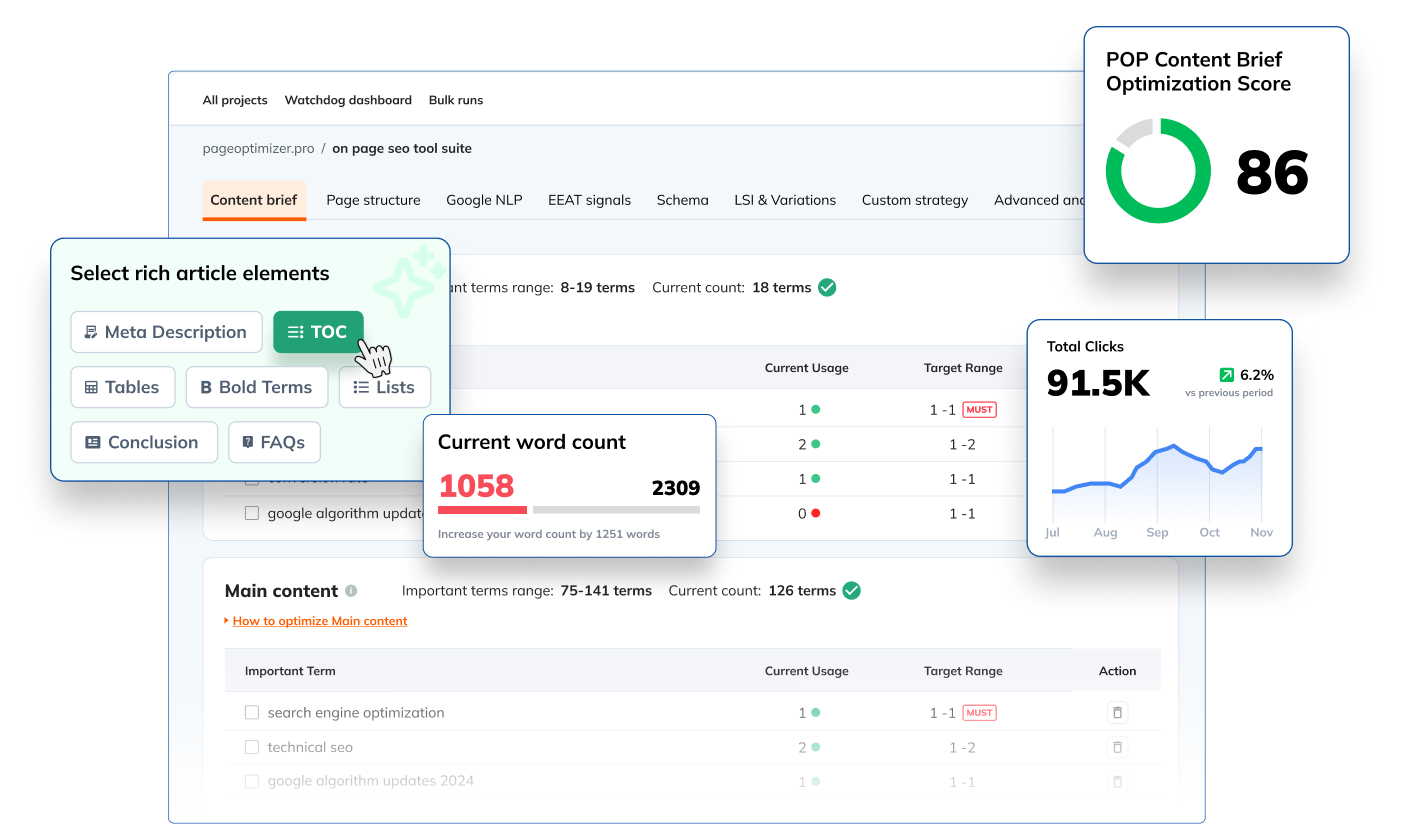
Tool 15: Page Optimizer Pro – Single-Page Optimization Approach
Page Optimizer Pro (POP) focuses on improving individual pages that have a direct impact on rankings and revenue. Rather than offering broad site-wide suggestions, it analyzes top-ranking competitors and identifies correlations between on-page elements and performance. Based on that comparison, POP recommends adjustments to headings, body content, keyword placement, and other page-level factors. This makes it especially useful for high-priority landing pages or commercial pages where small gains can deliver meaningful results.
When POP is used alongside deeper diagnostics from technical SEO audit tools, it provides a more complete picture of what’s holding a page back. Technical checks ensure the page is accessible and structurally sound, while POP highlights content-related gaps that may limit competitiveness. In practice, this often reveals the need for added topical depth, clearer headings, or better alignment with how competitors structure their content. The reports are intentionally straightforward, which means teams don’t need advanced statistical knowledge to take action. For focused, page-by-page optimization, POP offers clear guidance without unnecessary complexity.
Mid-Range Professional Tools for Growing Businesses
As your SEO work matures, you may hit the limits of lighter platforms. You’ll want bigger keyword databases, stronger competitive intel, and more flexible reporting. That’s when mid-range professional tools start to make sense. They’re more expensive, but they also consolidate several processes into one environment.
At this stage, your focus usually shifts from “What should we publish?” to “How do we protect and expand what we’ve already built?” Advanced crawling, historical data, and refined backlink analysis tools become critical. These platforms are best adopted once you have a consistent SEO workflow and enough content volume to justify their depth.
Industry-Leading Comprehensive Platforms
SEMrush and Ahrefs are the two names most SEOs think of when they hear “all-in-one platform.” SEMrush offers broad coverage across keywords, competitors, content ideas, and PPC insights. Ahrefs is particularly strong in links and content discovery, with a massive index that surfaces opportunities others miss.
These tools shine when you’re:
- Managing multiple sites or brands
- Operating in highly competitive niches
- Building large-scale content programs
They sit above the best SEO tools for small business in terms of cost, but they also replace several tools at once. For growing companies, that trade-off is often worth it, especially when you need deep SERP comparisons, historical trend charts, and more sophisticated link cleanup or acquisition strategies.
Specialized Technical SEO Solutions
Screaming Frog and Sitebulb are the go-to tools when your main concern is technical health. They crawl your site like a search engine would and then surface problems with status codes, redirects, canonicals, duplicate content, and internal linking. Screaming Frog is fast and scriptable; Sitebulb adds visualizations and explanations that help non-specialists understand what’s wrong.
Used together with technical SEO audit tools or reporting dashboards, these crawlers create a deep picture of how search engines experience your site. They’re most useful once your content library and traffic levels justify frequent, detailed technical checks. For businesses preparing to scale or recover from past misconfigurations, they’re often the first real investment in technical SEO.
How to Choose the Right SEO Tools for Your Business
Assessing Your Current SEO Knowledge and Skill Level
Before you subscribe to anything, be honest about your team’s comfort level with SEO. Complex platforms can slow you down if no one has time to learn them properly. In many cases, starting with a smaller stack of best SEO tools for small business produces better results than jumping straight into advanced software.
A practical approach is:
- Begin with free Google tools and one or two light paid platforms
- Use them consistently for a few months
- Identify where you still feel blind or limited
Only then decide whether a heavier solution is necessary. The right tool is the one you can use regularly, not the one with the longest feature list.
Budget Planning and ROI Expectations
SEO tools are an investment, not just a subscription cost. To judge whether they’re worth it, look at how they change your behavior and results. Do they save time? Help you catch issues earlier? Uncover keywords you would never have found manually? If the answer is yes, they’re likely paying for themselves.
A typical small-business stack might combine:
- Free Google platforms
- One solid research tool
- One rank tracker or reporting solution
Layering in SEO reporting tools often improves perceived value because you can finally communicate impact clearly. As revenue grows, you can expand that stack, but the upgrades should follow your needs, not trend lists or fear of missing out.
The Final Thoughts
Small businesses don’t need enterprise budgets to build serious SEO momentum. With a thoughtful mix of free platforms and carefully chosen paid tools, you can understand what drives visibility, fix what holds you back, and double down on what works. This guide outlined how research, technical audits, reporting, content optimization, and competitive analysis all fit together inside one lean toolkit.
The next step isn’t to subscribe to everything—it’s to select the few tools that match your current stage, use them consistently, and review your results honestly. Over time, you can upgrade or expand as your needs evolve. Whether you stay with the best SEO tools for small business or eventually move into heavier platforms, the principle stays the same: let data guide your decisions, keep your stack manageable, and treat SEO as an ongoing process rather than a one-time task.
Turn Strategy Into Sustainable Growth
SEO delivers real value only when insight turns into action. Data alone doesn’t move rankings; consistent execution does. With Esign Web Services, businesses gain clarity on what matters, where to focus, and how to translate SEO insights into steady, measurable progress. The result is less guesswork, fewer wasted efforts, and a roadmap built around real opportunities rather than assumptions.
If you’re ready to move beyond scattered tactics and build SEO that compounds over time, now is the right moment to start. Reach out to the Esign Web Services team to discuss your goals, challenges, and next steps, or contact us now to explore how the right strategy and tools can support long-term visibility and sustainable growth.
Frequently Asked Questions
Question: Can I rank well on Google using only free SEO tools?
Answer: While free tools provide a solid foundation for SEO success, they often come with limitations such as restricted data access, fewer features, and limited search queries. Many small businesses achieve good results with free tools initially, but paid tools offer more comprehensive data, advanced features, and competitive insights that can significantly accelerate your SEO progress and provide advantages over competitors who rely solely on free options.
Question: How much should a small business budget for SEO tools monthly?
Answer: Most small businesses find success with a monthly SEO tool budget between $30-100, depending on their industry competition, growth stage, and specific needs. Startups and very small businesses can begin with $0-30 monthly using primarily free tools, while growing businesses typically invest $50-150 monthly for more comprehensive tool suites. The key is starting small and scaling your tool investment as you see positive ROI from your SEO efforts.
Question: Which SEO tool is best for complete beginners?
Answer: Google Search Console combined with Google Analytics provides the best starting point for beginners, offering essential SEO data directly from Google at no cost. For paid options, KWFinder (part of Mangools) stands out for its user-friendly interface and comprehensive tutorials. These tools provide powerful insights without the complexity that can overwhelm newcomers to SEO.
Question: Do I need different tools for local SEO vs. national SEO?
Answer: While many SEO tools serve both local and national purposes, local businesses benefit significantly from tools with specific local search features such as local rank tracking, Google My Business optimization, and local citation management. Most of the 15 tools covered in this guide offer local SEO capabilities, with some like SE Ranking and Mangools providing particularly strong local search features within their affordable pricing tiers.
Question: How long does it take to see results from using SEO tools?
Answer: You’ll typically notice improvements in your SEO strategy and decision-making within 2-4 weeks of consistently using proper SEO tools, as you gain better insights into keyword opportunities, technical issues, and competitive landscapes. However, actual ranking improvements and traffic increases usually become visible within 3-6 months of implementing the optimizations identified through your tools, with the timeline varying based on competition level, website authority, and the scope of changes made.
Question: Should I use multiple SEO tools or stick to one comprehensive platform?
Answer: The best approach depends on your budget and specific needs. Starting with 2-3 complementary tools often provides better value than investing in expensive comprehensive platforms. For example, combining Google Search Console (free), KWFinder (keyword research), and Surfer SEO (content optimization) gives you powerful capabilities at a fraction of enterprise tool costs. As your business grows, you can evaluate whether consolidating to a comprehensive platform makes sense for your workflow and budget.
Question: Are SEO tools useful if my website is brand new?
Answer: Yes, SEO tools are especially valuable for new websites because they help you avoid early mistakes. They guide keyword selection, ensure pages are indexed correctly, and highlight technical issues before they limit growth. Starting with tools early creates a cleaner foundation and reduces the need for major fixes later.
Question: Can SEO tools replace an SEO expert or agency?
Answer: SEO tools support decision-making, but they don’t replace strategy or experience. Tools provide data, while experts interpret that data and prioritize actions. Many small businesses successfully manage SEO in-house using tools, but complex sites or competitive niches often benefit from professional guidance.
Question: How often should I check SEO tools and reports?
Answer: Most small businesses benefit from a weekly review cadence. Weekly checks help spot ranking shifts, technical issues, and traffic changes without becoming overwhelming. Monthly reviews are better suited for evaluating trends, content performance, and ROI from optimization efforts.
Question: Do SEO tools help with content ideas, or only rankings?
Answer: Modern SEO tools play a major role in content planning. They reveal what people search for, how questions connect, and which topics competitors overlook. This allows businesses to create content that matches real user intent rather than guessing what might perform well.
Author Details

Ashwani Kumar Sharma
Ashwani has been actively involved in SEO services since 2005. His expertise and distinctive work approaches have made him one of the most experienced and trusted SEO experts in the industry. He is a certified SEO and Google Ads professional. He also has strong business development skills in advanced SEO, PPC, and digital marketing strategies.


