



Core Web Vitals: How to Improve Website Performance & UX


Key Takeaways
- Convert images to WebP or AVIF to improve loading speed and reduce file size.
- Minify render-blocking resources like CSS and JavaScript for faster first content display.
- Defer non-critical scripts and split JavaScript to improve interactivity and INP scores.
- Predefine size attributes for media elements to prevent unexpected layout shifts and CLS.
- Use PageSpeed Insights and Lighthouse regularly to audit Core Web Vitals performance.
- Embed Core Web Vitals checks into development cycles to catch performance regressions early.
In the ever-evolving world of digital marketing, Core Web Vitals have become the cornerstone of both user experience and search engine rankings. As of 2026, Google’s Core Web Vitals metrics; Largest Contentful Paint (LCP), Interaction to Next Paint (INP), and Cumulative Layout Shift (CLS), serve as critical signals in its ranking algorithm.
These metrics go beyond technical speed and reflect how real users experience your website. For instance, if a page takes more than 2.5 seconds to load (LCP) or shifts content unexpectedly (CLS), it undermines user trust and increases bounce rates. A seamless user experience across all devices, especially mobile, is now expected.
Core Web Vitals SEO strategy isn’t optional anymore; it’s essential. Understanding what are Core Web Vitals and how to improve Core Web Vitals can directly influence your visibility, engagement, and conversions. Imagine a small e-commerce site losing thousands in revenue just because product images load too slowly or pop-ups shift the checkout button.
Whether you manage a blog, run a startup, or operate a large-scale enterprise, following a structured Core Web Vitals guide will help maintain speed, stability, and responsiveness. This blog will walk you through Core Web Vitals optimization steps and practical strategies to pass the Core Web Vitals assessment using the latest tools and insights.
Understanding Core Web Vitals and Their Impact
Core Web Vitals are more than just user experience signals; they are reflections of your users’ real-time experience. The three primary Core Web Vitals metrics; LCP, INP, and CLS; cover loading speed, interactivity, and visual stability, respectively.
These metrics serve as a direct signal of user satisfaction. If your pages are slow to load, unresponsive, or visually unstable, it erodes trust and leads to higher bounce rates. Optimizing these vitals is not just about better rankings, it’s about delivering a seamless, frustration-free experience that keeps users engaged.
Let’s break it down:
- LCP measures how quickly the largest visible content (usually a banner or headline) loads
- INP measures responsiveness during interactions like clicks or form submissions
- CLS ensures layout elements stay in place while loading
These metrics are essential not only for Google’s ranking algorithm but also for ensuring that your visitors stay engaged and convert into customers.
For example, a landing page that delays interaction by even 300 milliseconds might see a 10% drop in conversions. Core Web Vitals for mobile users is especially crucial, as mobile browsing dominates and users expect instant, smooth performance. Failing in any metric often means missing out on top search rankings.
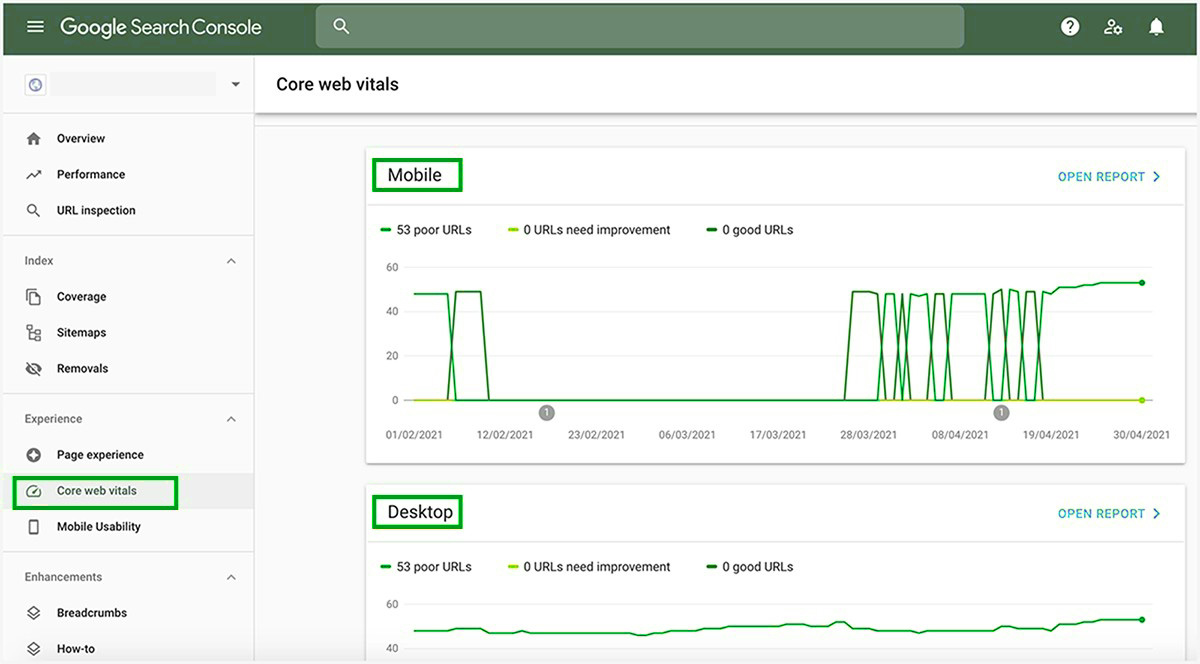
Core Web Vitals optimization isn’t just for developers; marketers, content creators, and web designers must collaborate to ensure these standards are met. Leveraging tools like PageSpeed Insights, Lighthouse, and the Core Web Vitals report in Google Search Console allows businesses to perform a detailed Core Web Vitals assessment and identify friction points. If you’re serious about growth, Core Web Vitals optimization should be on your 2026 digital checklist.
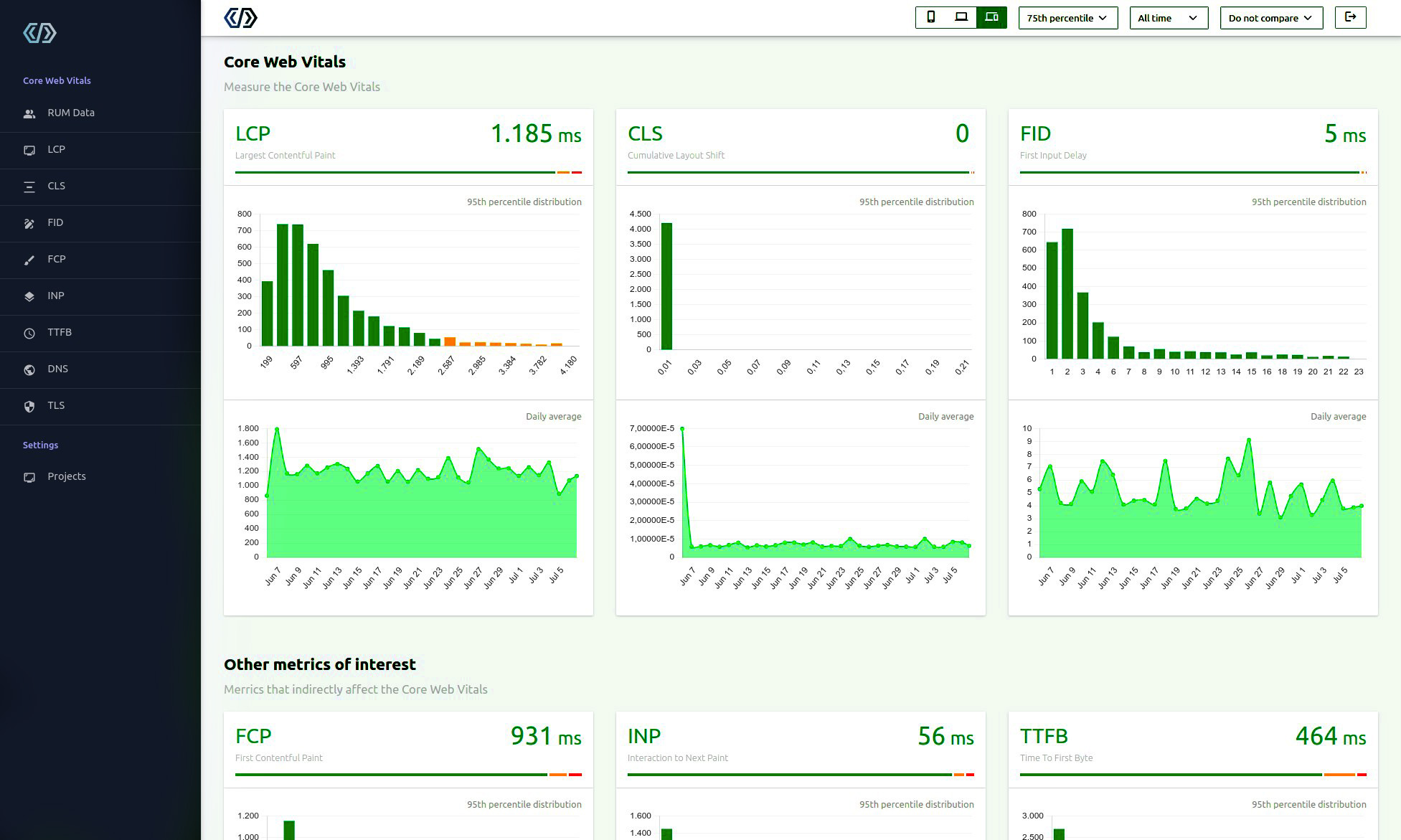
Measuring and Analyzing Core Web Vitals Performance
Before you can improve Core Web Vitals, you need to understand how to measure them accurately. Google provides several tools to help assess and improve Core Web Vitals performance, each offering unique insights.
PageSpeed Insights offers both lab data and field data to identify issues impacting Core Web Vitals metrics. For example, if your LCP score is over 2.5 seconds, it might highlight unoptimized images or server response delays.
Google Search Console’s Core Web Vitals report shows real-user metrics from CrUX (Chrome User Experience Report), ideal for understanding performance at scale. Chrome DevTools and Lighthouse provide granular details like unused JavaScript or render-blocking resources, offering actionable recommendations for Core Web Vitals optimization.
Lab vs Field Data Comparison
| Data Type | Description | Use Case | Tools Used | Limitation |
| Field Data | Real user metrics from actual sessions and environments | Ongoing performance monitoring | Google Search Console, CrUX | Less granular, slow update frequency |
| Lab Data | Simulated performance in a controlled environment | Pre-deployment debugging | Lighthouse, Chrome DevTools, PageSpeed Insights | Doesn’t reflect real-world variations |
| Hybrid Metrics | Combined lab and field data for comprehensive optimization view | Strategic planning and auditing | PageSpeed Insights | Requires expert interpretation |
Using both ensures you diagnose accurately and validate at scale. In 2026, proactive Core Web Vitals assessment using these tools is essential to prevent performance debt.
Regularly combining field and lab data allows you to spot hidden bottlenecks and trends over time. This dual-layer approach empowers your team to make smarter optimization decisions, reduce trial-and-error, and maintain top performance across varied user environments and devices.
Optimizing LCP for Faster Loading Times
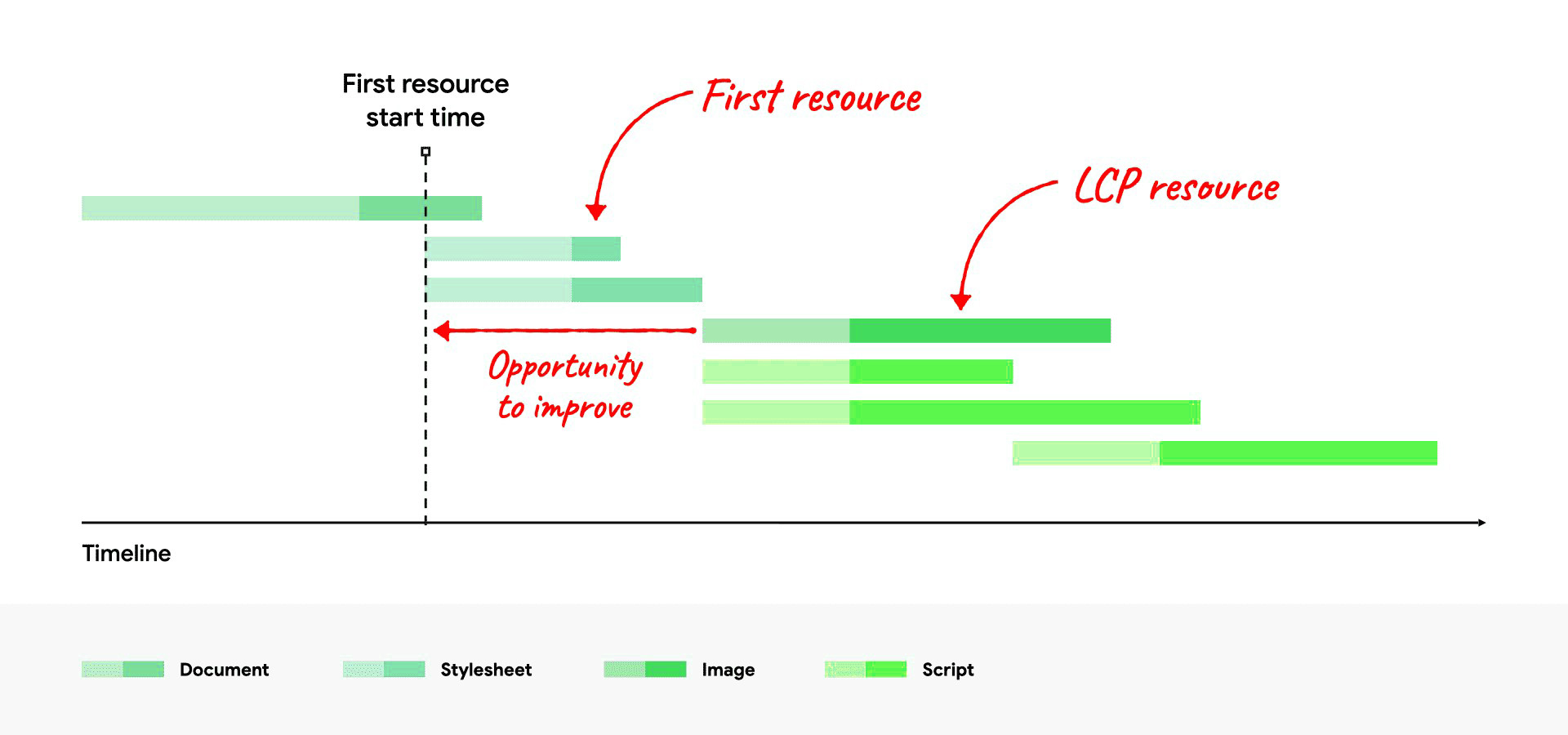
Enhancing your website’s Largest Contentful Paint (LCP) is essential for improving Core Web Vitals and creating a seamless user experience. LCP specifically measures how quickly the largest visible content element, like a hero image or heading; loads within the viewport. In many cases, the delay doesn’t come from the “big element” alone; it happens because the browser starts loading other resources first (stylesheets, scripts, fonts), and the LCP resource begins late on the timeline, leaving a clear gap that shows an opportunity to improve. In 2026, an optimized LCP is non-negotiable for both ranking and retention. Below are proven tactics to improve LCP performance:
- Convert images to WebP or AVIF for lighter file sizes and faster loading.
- Lazy-load below-the-fold images to prioritize above-the-fold content and accelerate load time.
- Minify and compress render-blocking CSS and JavaScript for quicker rendering of visible elements.
- Preload important assets such as fonts, logos, or featured images to speed up critical load paths.
- Use a global CDN to serve assets from geographically closer servers, improving response time.
- Reduce server response time (TTFB) by optimizing backend queries and infrastructure.
- Limit heavy third-party scripts that delay visual rendering and affect Core Web Vitals metrics.
Implementing these Core Web Vitals optimization steps ensures faster loading pages that meet Google’s ranking factors. When done consistently, they improve user engagement, lower bounce rates, and enhance overall page speed insights improvements; helping you gain a competitive edge in 2026 and beyond.
Faster Interactions Through INP Optimization
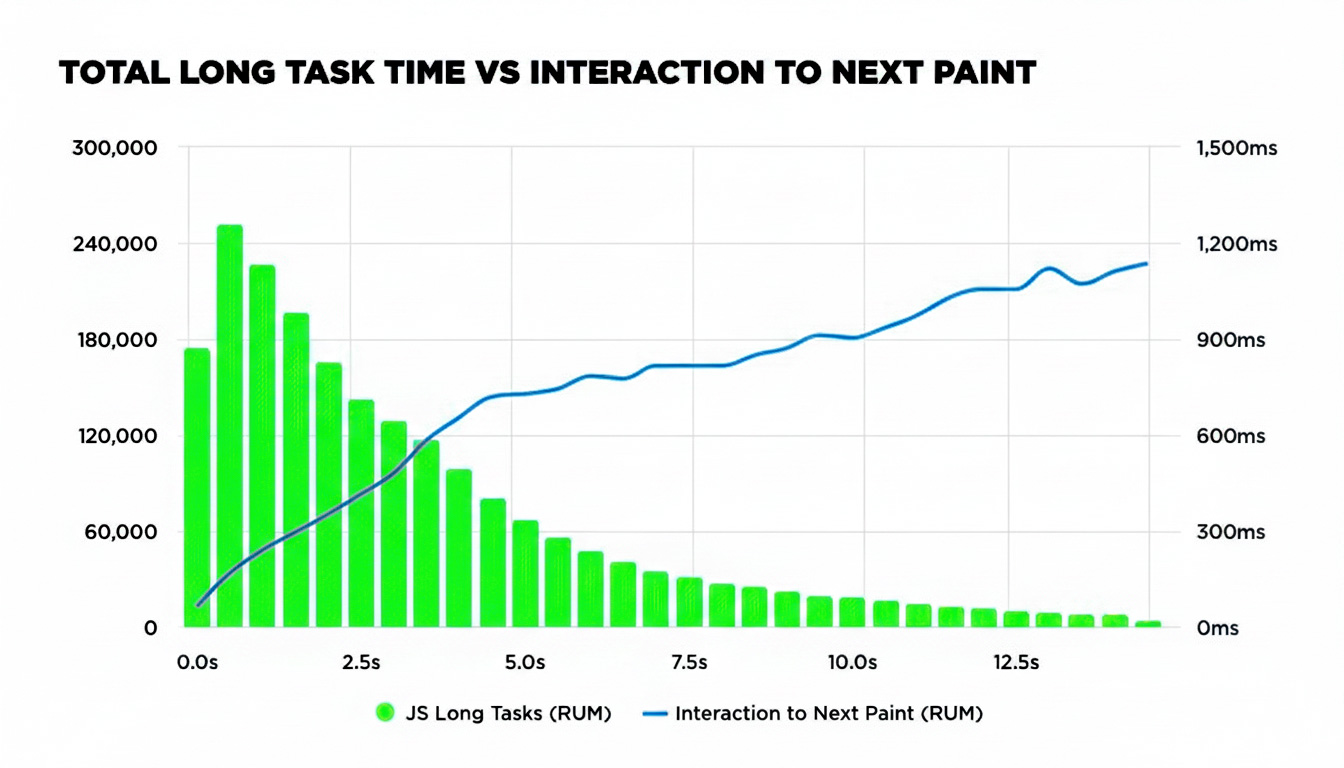
With Interaction to Next Paint (INP) becoming the primary interactivity metric in 2026, optimizing this component of Core Web Vitals is critical to ensuring fast, responsive experiences. INP measures how long it takes for your site to respond to a user’s action; like clicking a button or typing in a field. INP performance typically comes down to three angles: what’s affecting responsiveness, the strategies you apply to speed it up, and the common pitfalls that quietly create lag. A sluggish INP leads to frustration, abandonment, and poor SEO performance. Behind the scenes, INP often rises for one simple reason: long JavaScript tasks hog the main thread, so the browser can’t paint the next visual update quickly. Here’s how to tackle it:
Here’s how to tackle it:
- Split large JavaScript bundles into smaller files to reduce load and execution time.
- Defer non-essential third-party scripts like chatbots, heatmaps, and social widgets.
- Leverage Web Workers to move heavy JavaScript processing off the main thread.
- Minimize long tasks that block interactivity by profiling scripts using DevTools.
- Simplify DOM structure to streamline the browser’s rendering and interaction workload.
- Adopt performance-focused frameworks that support async rendering and hydration.
- Implement lazy hydration for non-critical UI components to speed up initial interactivity.
Integrating these Core Web Vitals SEO best practices into your development workflow helps you detect and fix INP bottlenecks earlier. With tools like Lighthouse and PageSpeed Insights, you can spot the scripts and components that slow interactions. Prioritizing INP improves real-user responsiveness, reduces bounce risk, and keeps your site competitive in Core Web Vitals benchmarks.
Minimizing CLS for Visual Stability
A stable layout is key to delivering a professional, frustration-free browsing experience. Cumulative Layout Shift (CLS) measures how often and how much visual content moves unexpectedly during page load; a major component of Core Web Vitals. The video below shows a common CLS trigger: an image loads without reserved space, so the content jumps, and DevTools flags the shift on the timeline. Here’s how to reduce visual instability effectively:
- Define width and height for all images, videos, and iframe elements to reserve layout space.
- Add placeholder containers for ads, popups, or banners that load after page rendering starts.
- Use font-display: swap to prevent invisible text during font loading phases.
- Preload fonts and above-the-fold images to accelerate initial content display.
- Avoid layout-triggering animations; use transform and opacity instead of margin/height transitions.
- Design predictable UI elements by allocating space for sticky headers or floating buttons.
- Monitor layout shifts using Lighthouse and Chrome’s Layout Shift Regions for real-time insights.
These actions directly contribute to Core Web Vitals optimization, reduce bounce rates, and create a visually trustworthy experience. For content-heavy websites and ecommerce platforms, minimizing visual disruptions is crucial. A consistent layout fosters user confidence, improves time-on-site metrics, and supports higher conversion rates; ultimately aligning your site with modern SEO and UX expectations.
Pagespeed Insights Improvements and Continuous Monitoring
PageSpeed Insights improvements are crucial for maintaining top Core Web Vitals scores. In 2026, this tool is more advanced, integrating AI-based diagnostics and prioritization. To begin, tackle the issues flagged under “Opportunities” and “Diagnostics” tabs, these often highlight problems with unused JavaScript, render-blocking resources, and unoptimized images. For instance, PageSpeed Insights may flag third-party scripts delaying INP; deferring or asynchronously loading them improves interaction responsiveness.
Core Web Vitals optimization also includes adjusting your server setup. Implement server-side caching, use a CDN to reduce Time to First Byte (TTFB), and compress text files using GZIP or Brotli. One overlooked factor is proper font loading; using font-display: swap ensures text remains visible while custom fonts load, reducing CLS. Continuous Core Web Vitals assessment should be embedded into your DevOps workflow. Set up CI/CD pipelines to run Lighthouse audits automatically before deployment.
Use monitoring tools like WebPageTest or SpeedCurve to get real-world performance metrics post-launch. For content-heavy sites like blogs or news portals, setting performance budgets for assets (e.g., max JS size per page) helps maintain discipline. Monthly reviews of PageSpeed Insights improvements can reveal trends; perhaps INP degrades only on specific pages or devices. Ultimately, your Core Web Vitals checklist isn’t a one-off task; it’s a living strategy for site speed, user satisfaction, and long-term SEO wins.
Why Core Web Vitals Matter for SEO and UX
Core Web Vitals ranking factors now serve as a differentiator in Google’s algorithm; especially when content quality is comparable across competitors. A site that loads faster, responds quicker, and remains visually stable has a clear edge in user engagement and conversion. Studies show that improving LCP by just one second can increase conversions by up to 15%. For SEO experts, integrating Core Web Vitals into page experience signals means ignoring them puts your rankings at risk. For users, poor Core Web Vitals can feel like laggy forms, disappearing buttons, or jumpy product pages; all of which damage trust. For instance, an eCommerce site with CLS issues might cause a shopper to click the wrong button mid-purchase. Core Web Vitals for mobile matter even more: mobile users bounce quickly when faced with delays.
Google’s mobile-first indexing reinforces the need for fast, responsive design.By applying Core Web Vitals optimization steps, such as compressing assets or preloading critical resources, you reduce friction and boost confidence. Moreover, Core Web Vitals SEO is measurable, trackable, and improvable; giving you concrete KPIs to justify your efforts. Ultimately, Core Web Vitals aren’t just a ranking checkbox; they’re a commitment to superior user experience, which drives higher engagement, better retention, and a strong competitive edge in 2026’s digital landscape.
Your Core Web Vitals Game Plan
Optimizing for Core Web Vitals is no longer optional, it’s the baseline for modern digital performance. Whether you’re running a small business site, a SaaS platform, or an eCommerce store, your users expect speed, stability, and seamless interaction. This Core Web Vitals guide emphasized the importance of each metric—LCP, INP, and CLS; and provided actionable steps for Core Web Vitals optimization. Use tools like PageSpeed Insights, Lighthouse, and Google Search Console regularly to assess performance.
Remember, Core Web Vitals SEO doesn’t just impact your search rankings; it affects how users perceive your brand. A fast, stable site communicates professionalism and care. Mobile-first design, optimized images, minimized JavaScript, and smart font loading should be part of your daily checklist. Continue monitoring your Core Web Vitals assessment data monthly and after major updates.
Educate your team and bake performance into your design and development workflows. Don’t wait for rankings to drop; proactively refine your site using the Core Web Vitals checklist. PageSpeed Insights improvements are low-hanging fruit that deliver fast results. In the competitive web of 2026, success belongs to websites that perform flawlessly, load instantly, and feel great to use. Make Core Web Vitals part of your long-term digital growth strategy; and you’ll turn better performance into better business.
The Final Thoughts
In today’s hyper-competitive digital landscape, Core Web Vitals have evolved from backend concerns to business-critical benchmarks. These metrics—LCP, INP, and CLS—aren’t just technical indicators; they define how users perceive your brand from the very first click. A sluggish load time, delayed interaction, or jarring layout shift can silently kill conversions and push potential customers into your competitor’s arms.
As we move deeper into 2026, website performance is directly tied to trust, engagement, and revenue. Google continues to tighten its focus on page experience, making Core Web Vitals optimization a foundational SEO and UX strategy. Whether you’re running a blog, scaling an ecommerce platform, or growing a local business, investing in a fast, smooth, and stable experience is no longer optional; it’s expected.
But optimizing Core Web Vitals isn’t just a one-time fix. It requires consistent auditing, smart tools, and expert-level strategy to stay ahead of performance regressions. That’s where many businesses fall behind. Don’t let your site be one of them.
Call to Action: Let’s Build a Website That Performs Like a Pro
At eSign Web Services, we help forward-thinking businesses stay fast, rank higher, and convert better. Backed by nearly two decades of digital expertise, we deliver the strategy and execution needed to future-proof your website’s performance. Request a Free Quote; let’s turn speed into revenue.
Frequently Asked Questions
Author Details

Ashwani Kumar Sharma
Ashwani has been actively involved in SEO services since 2005. His expertise and distinctive work approaches have made him one of the most experienced and trusted SEO experts in the industry. He is a certified SEO and Google Ads professional. He also has strong business development skills in advanced SEO, PPC, and digital marketing strategies.


