



How to Conduct an Effective SEO Audit: A Complete Step-by-Step Process


Key Takeaways
- A comprehensive SEO audit checklist identifies technical, content, and link issues that impact organic search performance.
- Use SEO site audit tools like GSC, Screaming Frog, and Ahrefs to collect critical insights.
- Check crawlability and indexability through the Index Coverage Report (GSC) to identify and resolve hidden barriers.
- Prioritize page speed optimization and core web vitals (LCP, CLS, INP) to improve rankings.
- Optimize thin content, keyword targeting, and structured data/schema markup for search engine clarity.
- < Analyze your backlink profile to identify and remove toxic links, thereby strengthening your domain authority effectively.
- Study user behavior to enhance navigation, increase engagement, and boost conversions throughout the funnel.
- Conduct this SEO audit checklist every 6–12 months to maintain optimal performance and stability in rankings.
Performing a comprehensive website SEO audit is no longer optional—it’s the foundation for sustainable growth and better search visibility. Whether you run a startup, a local business, or an established eCommerce brand, understanding your site’s technical health, content relevance, and link authority is key to unlocking its true ranking potential. An audit exposes what’s slowing you down—broken links, crawl errors, poor Core Web Vitals, or outdated content—and replaces guesswork with clarity.
Search algorithms evolve constantly. Factors like mobile-first indexing, semantic relevance, and page experience now play as big a role as keywords and backlinks once did. That’s why learning how to perform an SEO audit step by step ensures your site meets Google’s modern standards while delivering an effortless user experience.
An effective SEO audit process examines every layer of performance—from crawlability and indexability to on-page optimization, structured data, and the quality of backlink profiles. It identifies gaps, prioritizes fixes, and builds a roadmap for measurable improvement. This guide will walk you through the complete SEO audit checklist, showing you exactly how to find issues, interpret data, and turn insights into higher rankings, stronger engagement, and more qualified traffic.
1. Getting Ready for Your SEO Investigation
Before diving into the data, prepare your digital lab. Gather essential SEO tools, define your objectives, and set benchmarks — this groundwork ensures that your SEO audit checklist delivers accurate and actionable insights.
- Build your toolkit. Utilize SEO site audit tools, including Google Search Console (GSC), Google Analytics 4, Screaming Frog, Ahrefs/SEMrush, GTmetrix, and PageSpeed Insights. These provide the breadth to evaluate the entire SEO audit process—from crawl errors and content gaps to user behavior and links. These tools automate deep scans, ensuring every technical and on-page issue is detected quickly.
- Benchmark your baseline. Pull current rankings, organic sessions, conversions, top landing pages, bounce/engagement metrics, and sitewide technical health. Save these snapshots so you can measure the impact after making the fixes. Accurate benchmarks reveal performance shifts, proving which SEO fixes actually drive measurable improvement.
- Align with Google’s priorities. Your audit criteria should reflect core web vitals (LCP, CLS, and INP), E-E-A-T, and mobile-first standards. If your pages are slow, shaky on layout, or weak on trust signals, expect underperformance. Staying up to date with Google’s standards ensures long-term visibility and protects against fluctuations in the algorithm.
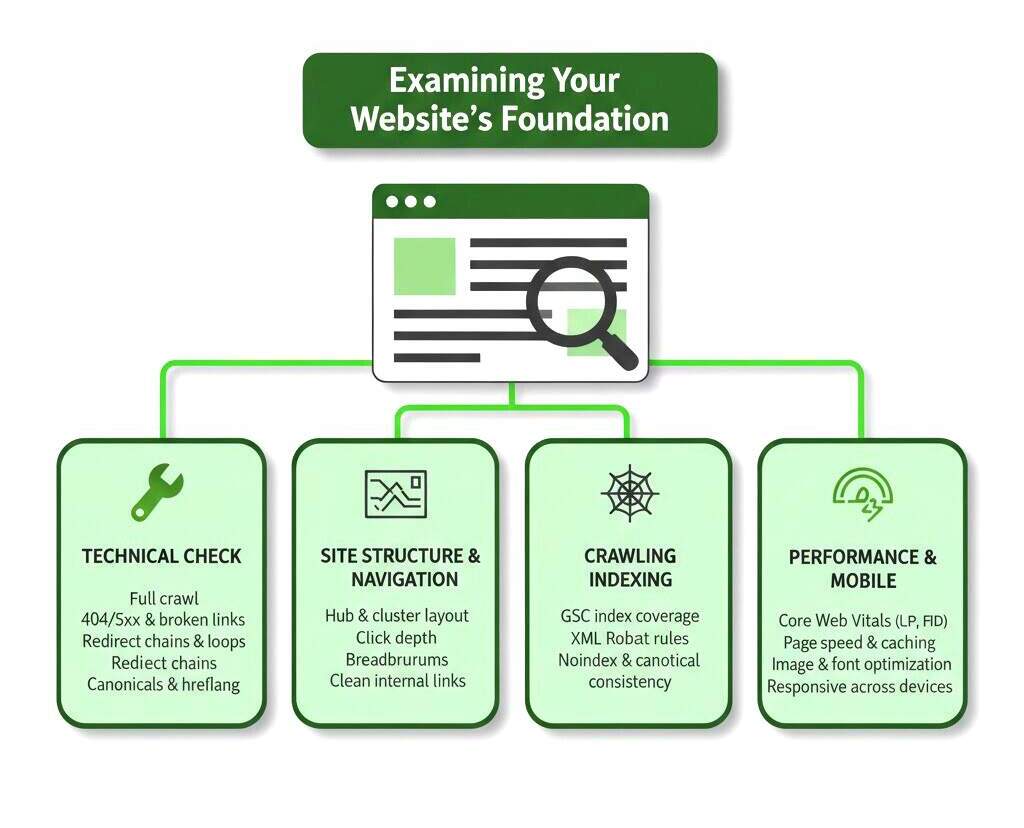
2. Examining Your Website’s Foundation
Think of this stage as your site’s structural X-ray. The technical framework decides how clearly search engines see and trust your pages—solid foundations lead to stronger rankings and smoother performance.
- Technical health check (crawl + fixes). Run a full crawl with Screaming Frog/Sitebulb. Flag and fix: 404s/5xx errors, broken internal links, mixed content, unnecessary redirect chains, duplicate titles/H1s, missing canonical URLs, orphan pages, and inconsistent hreflang (if applicable). A rigorous technical SEO audit checklist prevents search engines from tripping over basics.
- Site structure & navigation. Validate your hub/cluster architecture, click depth, pagination, and breadcrumbs. A clean, shallow structure enhances discovery and consolidates topical authority. Organized navigation helps search engines crawl efficiently and improves user experience across all devices.
- rawling & indexing. In GSC’s index coverage report (GSC), compare submitted vs. indexed URLs, then investigate soft 404s, excluded duplicates, blocked-by-robots, noindex, and server anomalies. Confirm that important pages are both crawlable and indexable. This is the core of website SEO audit hygiene and directly affects visibility. Also review XML sitemaps, robots.txt, and canonical consistency.
- Performance & mobile. Utilize PageSpeed Insights/Lighthouse and GTmetrix for optimizing page speed. Tackle image compression, modern formats, efficient font loading, code splitting, caching, and reducing main-thread work. Track core web vitals (LCP, CLS, INP) and ensure mobile-friendliness/responsive design across real devices, not just emulators.
3. Content Quality and Keyword Strategy
Content is where clicks turn into customers and rankings become revenue. Every word shapes visibility, every keyword defines intent—this is where strategy meets storytelling and drives real search impact.
- Content performance evaluation. Identify low-traffic pages, high-bounce entries, and thin/duplicated content. Decide whether to consolidate, rewrite, or remove. Watch for cannibalization (multiple pages chasing the same term) and fix with clear targeting and internal linking.
- Keyword research & mapping. For each important page, assign a single primary keyword and 2–3 supporting entities/queries. Balance volume vs. difficulty and map to intent (informational, commercial, transactional). This is the practical heart of an on-page SEO plan and a disciplined SEO audit process.
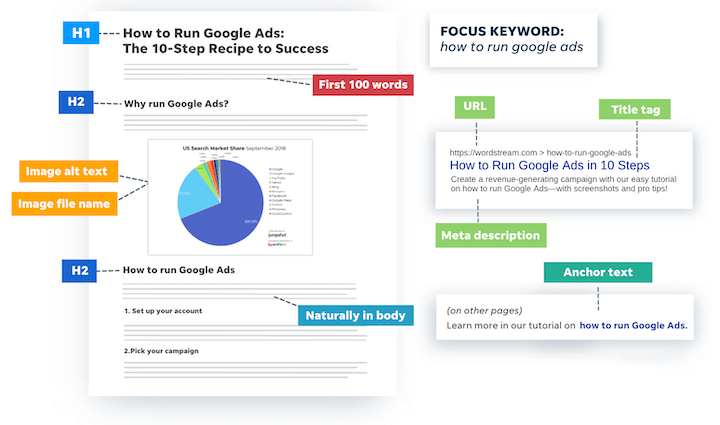
- On-page optimization review. Enforce one H1 per page, a logical H2/H3 structure, a focused meta title and description, scannable copy, media with descriptive alt text, and short, human-readable URLs. Build internal links from hubs to spokes, and add contextual links between related spokes to spread equity. Validate structured data/schema markup (Organization, Article, Product, FAQ, Breadcrumb) to improve SERP clarity.
4. Off-Page Authority and Link Profile Assessment
Authority isn’t built—it’s earned. Every credible link, mention, or citation magnifies your website’s reach, turning visibility into influence. The stronger your link ecosystem, the louder your brand echoes across search landscapes.
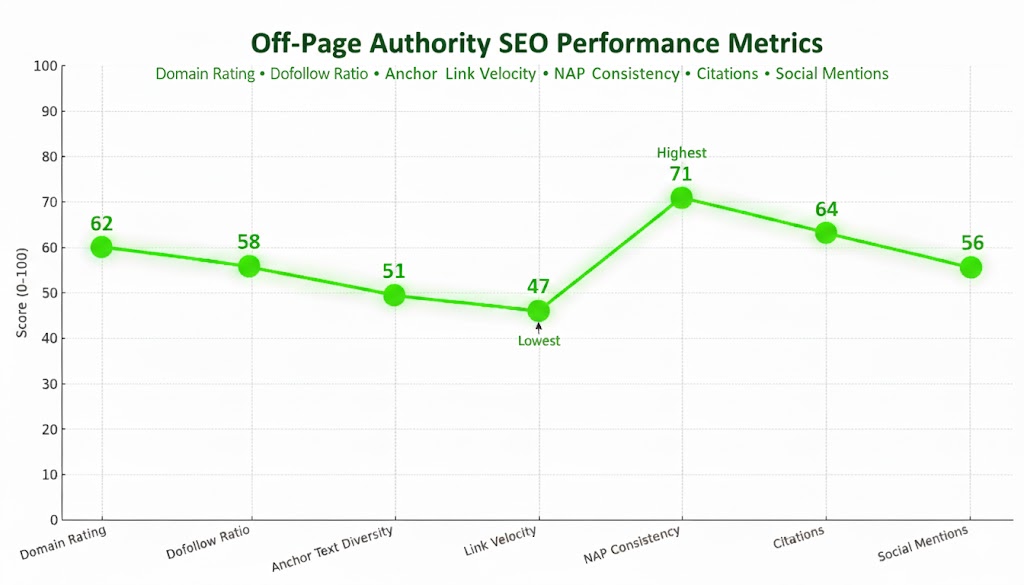
- Backlink quality analysis. Use Ahrefs/SEMrush to classify links by relevance, authority, and anchor mix. Spot toxic sources and disavow cautiously. Enhance your backlink profile quality with targeted digital PR, resource link building, and partnerships that align with your topical focus. This is classic off-page SEO done right.
- Local & citations. For local businesses, audit NAP consistency and category accuracy across Google Business Profile, Yelp, Bing Places, and industry directories. Inconsistency costs rankings. Consistent listings across directories enhance credibility, increasing your business’s visibility in local search results.
- Brand signals. Monitor mentions with Google Alerts or Brand24 and convert unlinked mentions into links. Social engagement isn’t a direct ranking factor, but it does reinforce brand trust and accelerate reach. Strong brand mentions and interactions increase awareness, authority, and long-term trust in competitive niches.
5. User Experience and Conversion Optimization
hen users hesitate, rankings freeze. Smooth navigation, fast pages, and smart design turn traffic into trust—and trust into conversions.
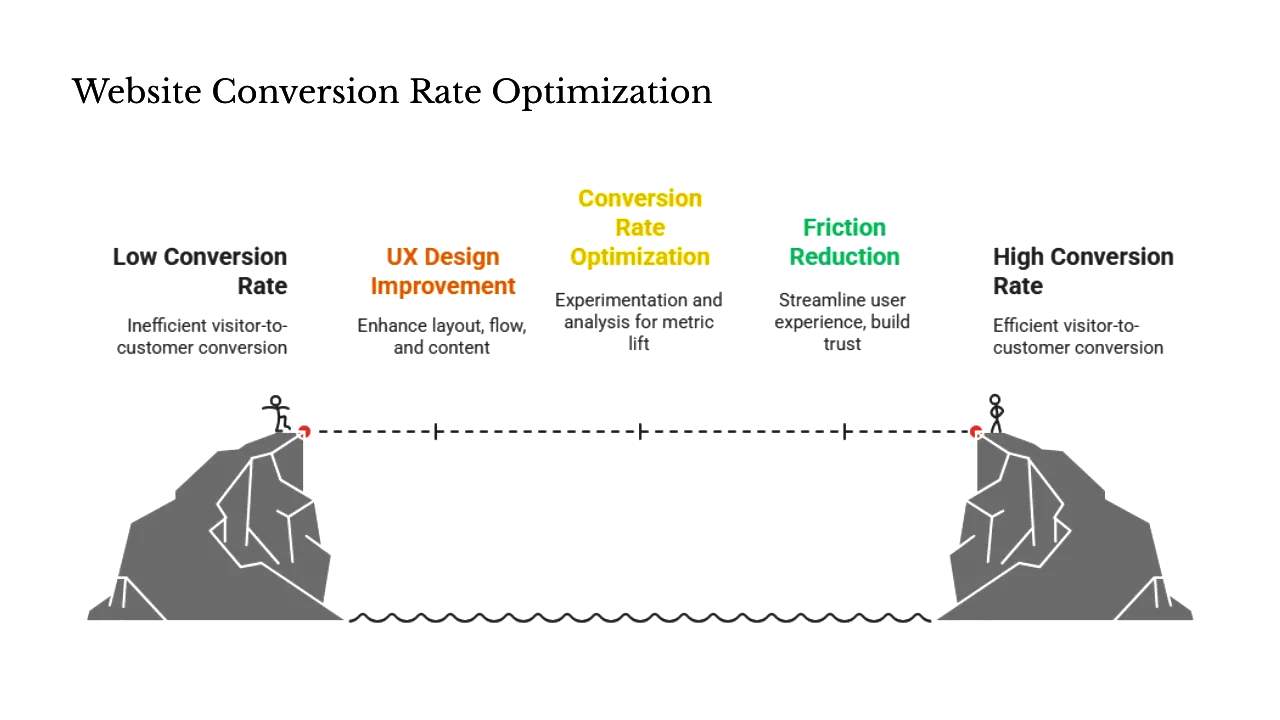
- Behavior insights. Use Microsoft Clarity/Hotjar to spot rage clicks, dead zones, and scroll drop-offs. If users miss your CTA or abandon forms, fix the friction. Utilize these insights to refine your UX decisions and enhance overall engagement and retention rates.
- Conversion-path optimization. Map funnel steps in GA4—landing pages → product/service pages → micro/macro conversions: test headlines, CTAs, layout density, and form length. Shave seconds from load time; slower pages bleed conversions. Simplified, faster conversion paths guide users naturally toward completing actions without confusion or hesitation.
- Page experience & accessibility. Re-check core web vitals (LCP, CLS, INP) after changes. Ensure color contrast, keyboard navigation, descriptive labels, and proper heading order. Accessibility upgrades typically enhance both SEO and conversions. A well-optimized, accessible website ensures inclusivity, better rankings, and stronger long-term user satisfaction.
Your Step-By-Step SEO Audit Process
- Crawl the site and identify and fix technical errors (using a technical SEO audit checklist).
- Validate crawlability and indexability; clean up index coverage report (GSC)
- Enhance page speed optimization and mobile-friendliness/responsive design with a Web Vitals plan.
- Audit content: remove thin pages, resolve cannibalization, and refine mapping.
- Rebuild on-page SEO: titles, headings, internal links, media, and structured data/schema markup.
- Strengthen off-page SEO by upgrading backlink profile quality, citations, and mentions.
- Optimize UX and funnels; re-test after changes.
- Re-benchmark and schedule a 6–12 month review.
Final Thoughts
Conducting a comprehensive SEO audit is more than just ticking boxes — it’s a strategic, layered process that uncovers roadblocks, highlights growth opportunities, and positions your website for long-term success. Whether you’re a business owner wearing multiple hats or a marketing manager leading growth initiatives, this audit serves as your roadmap to a more search-visible, conversion-ready website.
A well-executed audit uncovers what’s holding you back — from slow-loading assets and outdated schemas to overlooked metadata and broken links. Just as importantly, it shines a light on what’s working: optimized content, high-authority backlinks, and strong UX elements that drive engagement. Balancing fixes with enhancements unlocks sustainable growth in traffic, visibility, and ROI. SEO audits aren’t reactive fixes — they’re proactive performance tools. They help you stay aligned with Google’s ever-evolving ranking systems, user behavior shifts, and competitive benchmarks. When done consistently, SEO audits are momentum-builders.
Make this SEO Audit Checklist part of your digital routine — at least every 6–12 months or after major algorithm updates. Measure improvements. Refine your strategy. Keep evolving.
Ready to uncover what’s really holding your website back?
Get expert SEO services from at eSign Web Services take the guesswork out of SEO. With more than a decade of experience, 1,000+ five-star reviews, and no long-term contract commitments, we deliver SEO audits that drive measurable results.
Request a free quote — and let’s unlock your site’s full potential.
Frequently Asked Questions
How often should I conduct a complete SEO audit?
Most businesses should conduct a comprehensive SEO audit every 6–12 months and perform quarterly mini-audits focused on specific areas, such as content gaps, structured data accuracy, and page speed optimization, to stay aligned with Google’s evolving standards.
Can I do an SEO audit myself, or should I hire an expert?
You can perform many tasks yourself using SEO site audit tools such as Screaming Frog and Google Search Console. But for deeper issues such as schema markup or backlink profile quality, a professional audit can uncover problems you might otherwise overlook.
How long does a thorough SEO audit typically take?
A full audit of a small-to-medium site takes 3–5 days, depending on your experience with tools like Ahrefs, GSC, and Lighthouse. Large websites with crawlability and indexability issues or poor core web vitals may take longer to evaluate.
What’s the most important thing to fix first after an audit?
Address technical flaws that affect index coverage reports (GSC), crawl errors, or render-blocking resources. These are foundational issues that directly impact how your site is indexed and ranked by Google.
How do I know if my SEO audit was successful?
Track metrics like keyword rankings, bounce rate, and traffic after fixing issues. Improvements in mobile-friendliness / responsive design or core web vitals (LCP, CLS, INP) scores are strong indicators of SEO health.
What tools should I use for a DIY SEO audit?
Use a stack that includes GSC for indexing, GA4 for traffic, Screaming Frog for crawling, and Ahrefs for competitor SEO analysis and backlink audits. These tools help uncover gaps in performance, structure, and link equity.
Does a slow website affect SEO performance?
Yes. Poor load times impact page speed optimization and core web vitals, which are critical for ranking and user experience. Use GTmetrix or PageSpeed Insights to test and resolve speed-related issues across all devices.
Author Details

Ashwani Kumar Sharma
Ashwani has been actively involved in SEO services since 2005. His expertise and distinctive work approaches have made him one of the most experienced and trusted SEO experts in the industry. He is a certified SEO and Google Ads professional. He also has strong business development skills in advanced SEO, PPC, and digital marketing strategies.


