


How to Make Your Blog Posts AI-Ready without Writing for Robots

Key Takeaways:
- Making a blog “AI-ready” does not mean writing unnatural, mechanical content for algorithms. Google continues to recommend helpful, reliable, people-first content as the foundation for both regular Search and AI-powered Search experiences.
- Blog posts should answer the main question clearly, then add useful depth, context, examples, and supporting explanations.
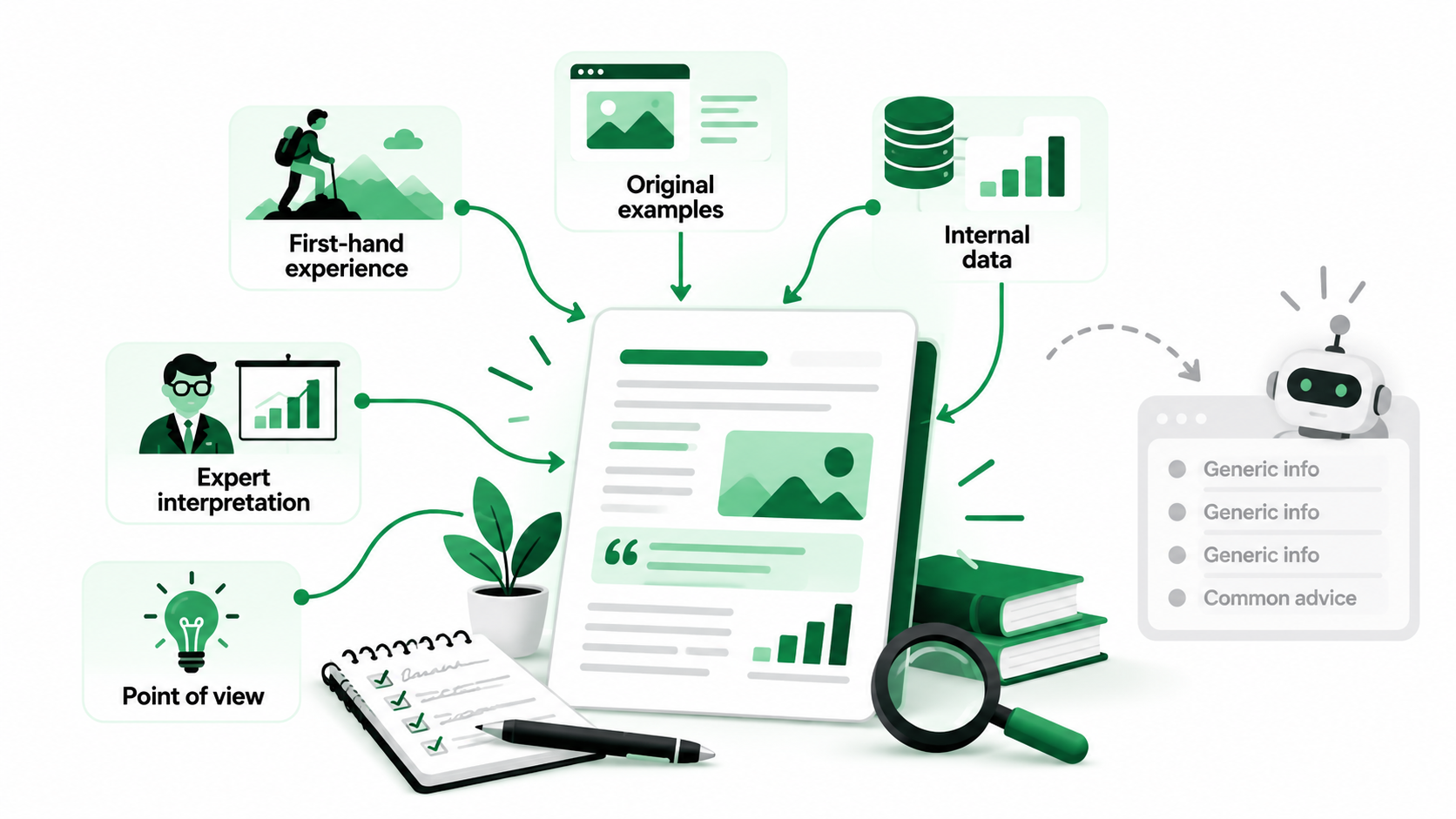
- Original information, first-hand experience, expert interpretation, research, and unique viewpoints can help content stand out from generic summaries that AI can easily reproduce.
- Clear headings, focused sections, descriptive language, and logical internal links can make content easier for both readers and search systems to understand.
- Google says there are no additional technical requirements specifically for appearing in AI Overviews or AI Mode beyond the normal requirements for Search eligibility.
- Structured data can help search engines understand eligible page information, but it should not be treated as a shortcut to AI visibility.
- AI-generated or AI-assisted content still needs human fact-checking, editing, and quality control because generated material can contain inaccuracies or add little original value.
- The strongest AI-ready content strategy improves clarity for machines without sacrificing personality, expertise, usefulness, or readability for people.
AI-powered search is changing how people discover and read online content. A blog that once competed mainly for traditional Google rankings may now appear alongside AI-generated answers, summaries, and recommendations. Naturally, the change has raised questions among writers and business owners. Should articles become shorter? Are there any formatting requirements for headings? Do we need to dumb down every sentence so artificial intelligence can understand? The answer is easier than it sounds. Search systems like good, clear, well-organized information, but readers still want useful explanations, original ideas, and writing that feels human.
In this blog, we’ll explain how to create AI-ready blog posts without turning your content into something mechanical or repetitive. We’ll talk about writing structure, direct answers, unique insights, technical SEO, and the role of AI writing tools. You’ll learn what optimization habits are worth keeping, what to avoid, and how to measure results without losing your brand’s natural voice.
What Does AI-Ready Content Mean?
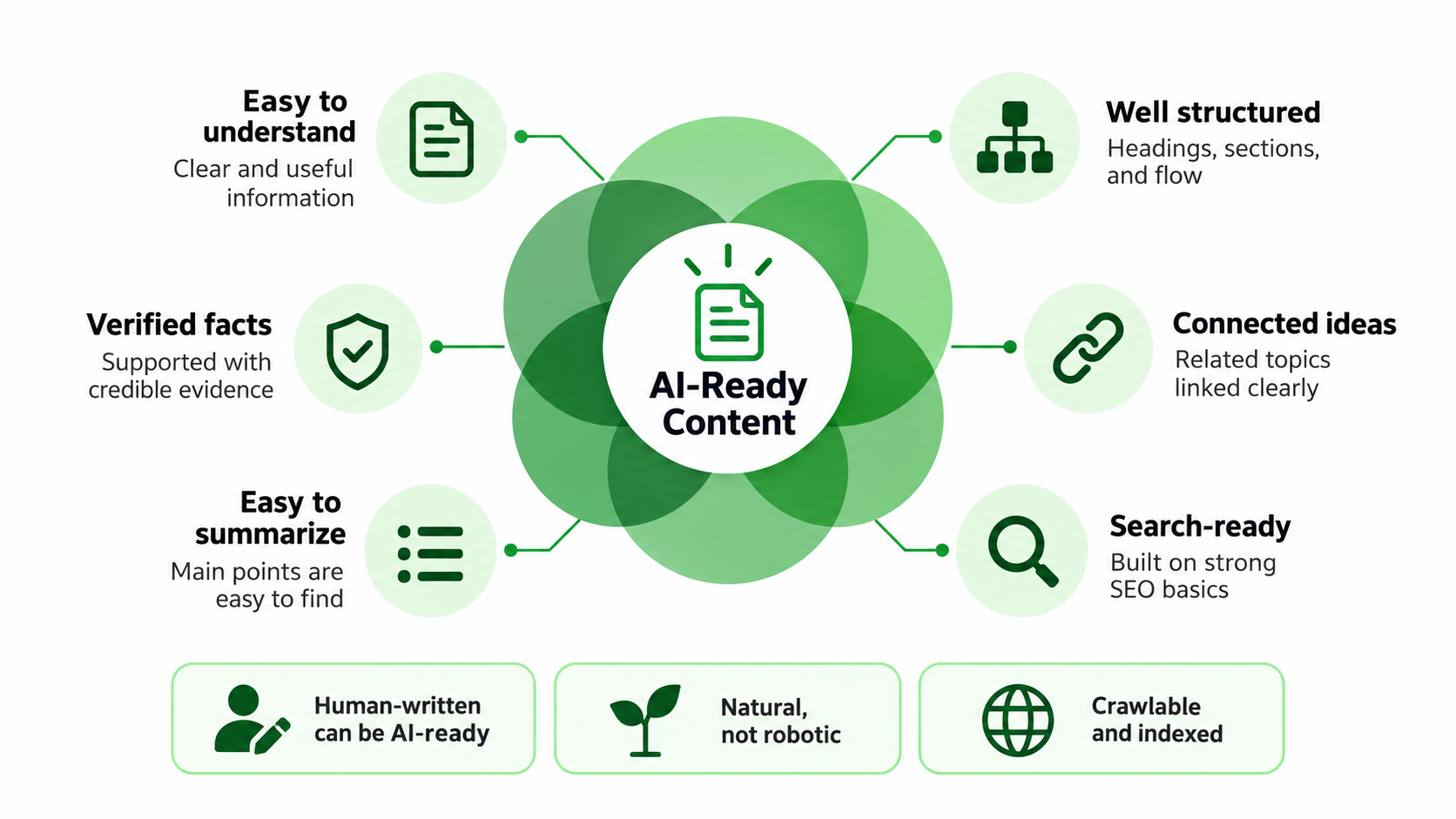
AI-ready content sounds like a technical term, but the idea behind it is simple. It describes information that is useful to people reading it but also understandable and usable by search systems. There’s no official Google category for content like this and no special formatting guideline that automatically qualifies a blog for AI-generated answers.
In practical terms, AI-friendly content should be easy to:
- Understand: Explain the subject clearly without unnecessary confusion.
- Parse: Organize information so different sections have recognizable purposes.
- Connect: Show how important ideas and related topics fit together.
- Verify: Support factual claims with credible evidence where necessary.
- Summarize: Communicate the main points without hiding them in unrelated details.
- Reference: Present useful information that can be understood within its proper context.
These qualities aren’t exclusive to AI systems. They also make articles easier and more enjoyable for people to read.
1. AI-Ready Does Not Mean AI-Written
You don’t have to create all the AI-ready blogs with artificial intelligence. A human writer can write an article that is easy to read, well-researched, and easy for search systems to digest. Likewise, an AI-generated draft can still be confusing, inaccurate, or unhelpful.
Google’s guidance is about the quality and intent of the content, not whether the content was written by AI. Using AI for research help or as a writing tool is one thing; publishing large quantities of material with little original value is quite another.
2. AI-Ready Does Not Mean Robotic
Some writers assume AI systems prefer short sentences, repeated definitions, and predictable formatting. That assumption can make articles feel lifeless.
Readers don’t want every section to begin with the same sentence pattern or every explanation to sound like a dictionary entry. Good writing may include longer explanations, natural transitions, examples, and professional judgment. Clarity is important, but not at the expense of personality.
3. AI-Ready Content Still Needs SEO Fundamentals
A clearly written article still needs a technically accessible website. Google explains that pages must meet normal search eligibility requirements, including being indexed and eligible to appear with a snippet, to be considered supporting links in AI Overviews or AI Mode.
That makes traditional SEO important. Crawlability, indexing, relevant content, clear navigation, and useful internal links remain part of the foundation.
Start With the Real Question Your Reader Wants Answered
A good article begins before the first paragraph is written. It starts with understanding why someone would search for the topic and what they hope to learn. When that purpose is unclear, articles often become collections of loosely related information rather than helpful resources.
1. Identify the Main Search Intent
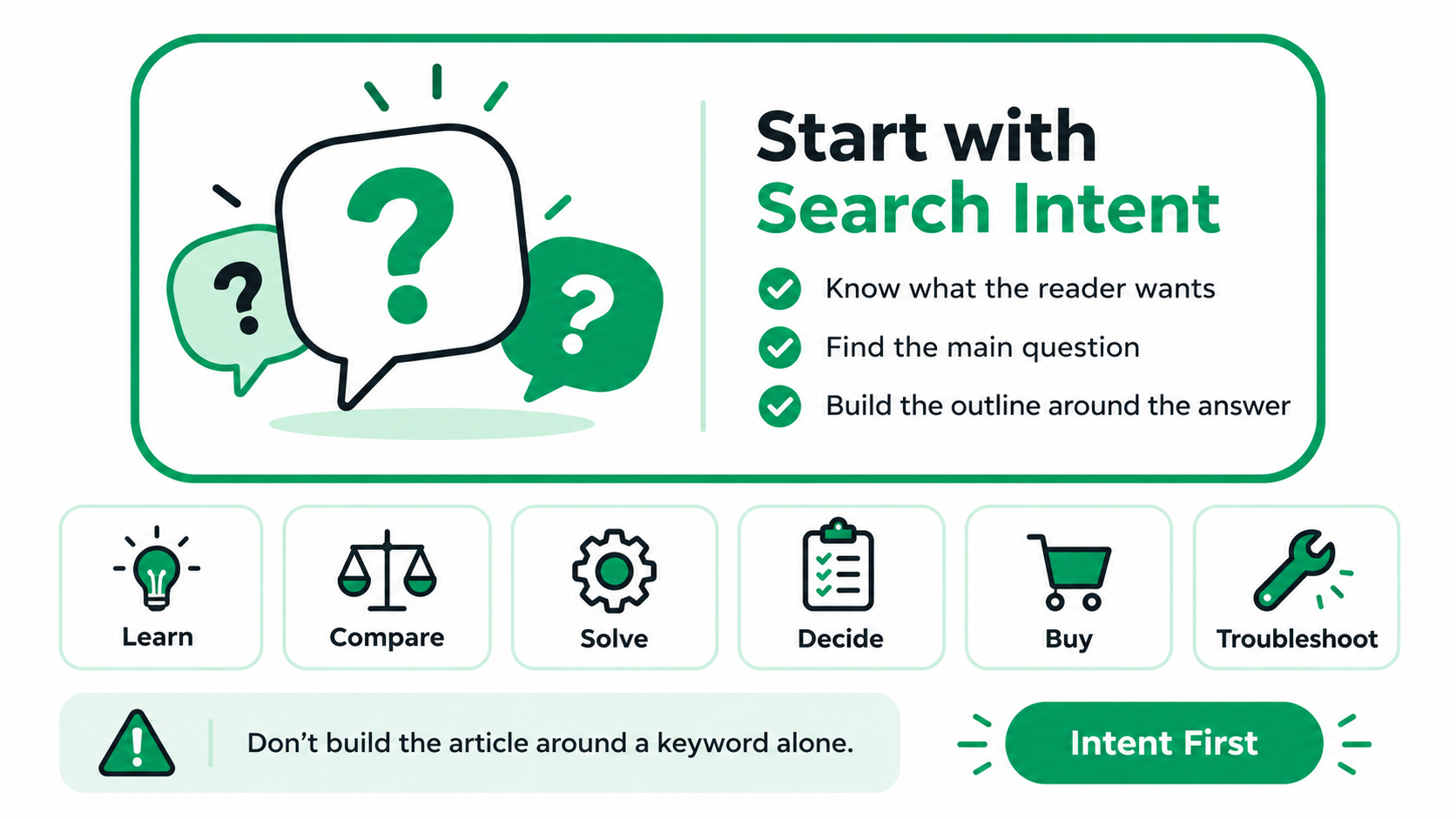
Before planning the outline, think about what the reader wants to accomplish.
They may be trying to:
- Learn: Understand a subject or unfamiliar concept.
- Compare: Evaluate two or more available options.
- Solve a problem: Find a practical solution to a specific issue.
- Make a decision: Decide which approach, service, or product is suitable.
- Buy: Find a provider or complete a purchase.
- Troubleshoot: Identify why something isn’t working.
For example, a person trying to find out why a website is loading slowly needs a different kind of explanation than a person looking to hire a web design agency. Knowing the purpose helps you decide what info, examples, and detail level you should include.
2. Do Not Build a Blog around a Keyword Alone
Keywords are useful for understanding what people search for, but they don’t always reveal the full reason behind the search. Consider the keyword “website security.”
The person using the term may want a simple explanation, a list of security measures to take, or professional help. If these differences are not taken into account when writing an article, the outcome can be an article that addresses the right subject but answers the wrong question. Use keywords as guidance, not as a replacement for understanding the reader.
3. Define the Main Question before Building the Outline
Try explaining the purpose of your article in one sentence. For example, a blog about website security might aim to answer, “What practical steps can a small business take to protect its website?”
That question gives the article a clear direction. If you struggle to identify one central problem, the topic may be too broad and need narrowing.
Use Clear Headings with Natural Variety
Headings help guide readers through an article by indicating the organization of ideas. They also add useful context for search engines. But, when the topic calls for explanations, comparisons, or analysis, making each heading a question can end up with a repetitive blog.
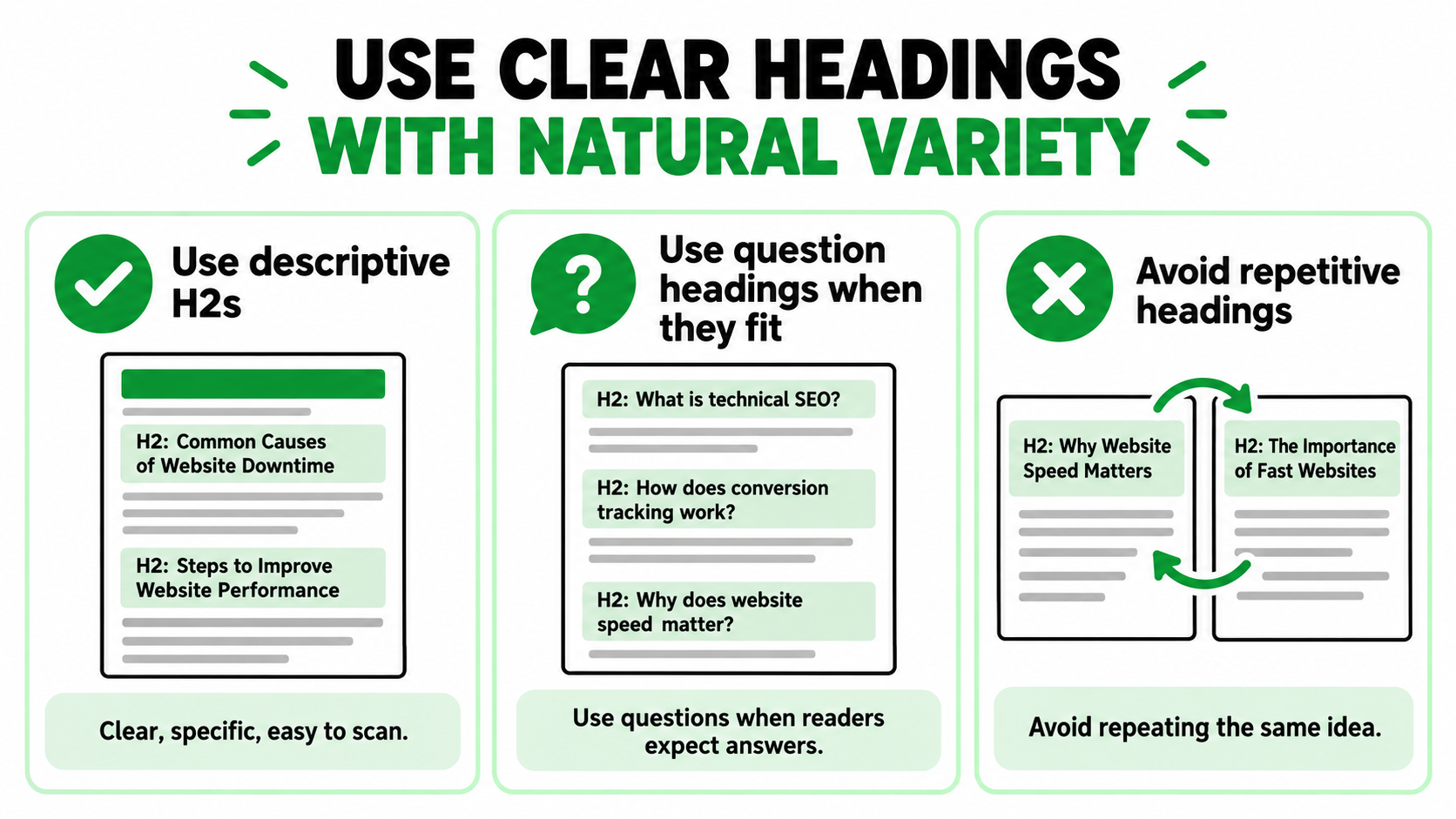
1. Make H2s Descriptive
A good H2 tells readers what the section covers. For example, “Common Causes of Website Downtime” communicates more than “Important Things to Know.” Descriptive headings make long articles easier to scan. They also help readers decide which sections deserve their attention.
2. Use Question Headings Where They Make Sense
Questions work well when the section directly answers something readers commonly ask.
Examples include
- What is technical SEO?
- How does conversion tracking work?
- Why does website speed matter?
But not every topic needs that structure.
A section discussing practical recommendations may be clearer with a heading such as “Steps to Improve Website Performance.” Choose the format that best represents the information.
3. Avoid repeating the same idea across several headings.
Similar headings can create unnecessary content. For example, “Why Website Speed Matters” and “The Importance of Fast Websites” may lead to nearly identical explanations. Instead of separating them, combine the ideas into one stronger section. Each heading should introduce something useful that hasn’t already been covered.
Write Sections around One Clear Idea at a Time
An article becomes harder to follow when individual sections try to explain several unrelated concepts. Focused sections give readers a clear path through the information. They also help search systems understand what each part of the article discusses.
1. Keep Each Section Purposeful
Each section should respond to a specific question or explain a main idea. For example, a section about website image compression should explain why large images are slowing pages down and how compression can help. It doesn’t have to mention side topics like social media marketing or email marketing. The narrower the discussion, the more useful the explanation.
2. Use Paragraph Breaks Naturally
Paragraphs should be long enough to develop an idea but short enough to remain comfortable to read. There’s no need to force every paragraph into exactly two or three sentences. A simple explanation might need only a few lines. A complicated comparison may require more detail. Let the subject determine the paragraph length.
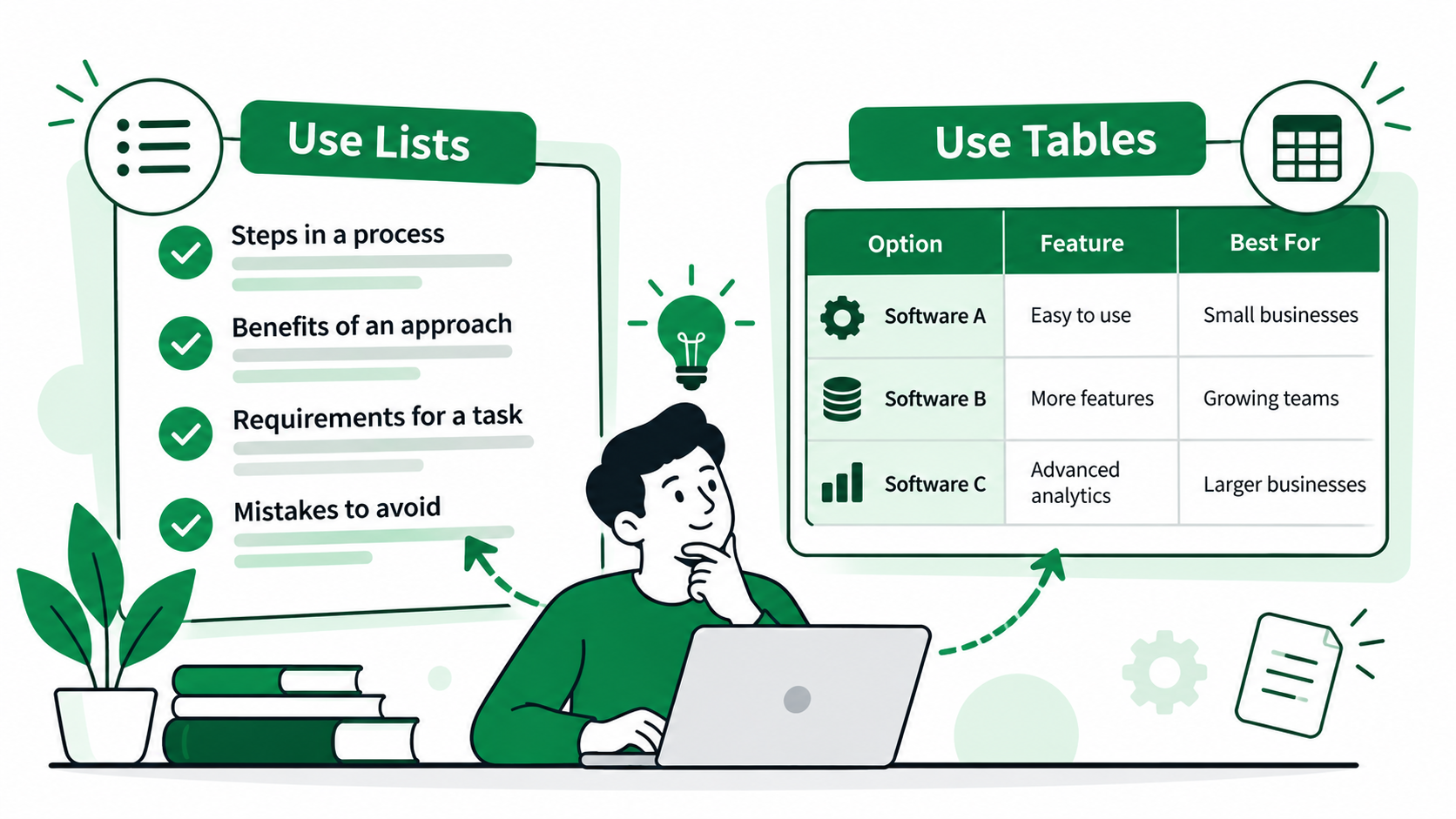
3. Mix Paragraphs, Lists, and Tables
Different formats are for different types of information. Paragraphs work well for explanations and reasoning. Lists work well for related steps or items. Tables can help readers compare alternatives.
For example, a table can be easier to understand than several long paragraphs when comparing two website hosting plans. Pick a format that helps the reader do something.
Add Information AI Cannot Easily Recreate
AI tools can generate general explanations quickly. They can summarize common advice, define terms, and put information into recognizable formats.
However, companies and professionals tend to have insights that are more in-depth than what generic online articles can offer. That knowledge can bring more personality and real usefulness to the content.
1. Use First-Hand Experience
First-hand experience gives readers information drawn from actual work rather than general assumptions.
Useful examples include:
- Lessons learned from completed projects.
- Observations from testing different approaches.
- Questions customers regularly ask.
- Mistakes a team repeatedly encounters.
- Practical workflows developed through experience.
For example, a marketing professional may explain why a campaign received many clicks but few qualified leads. The value is in telling what was seen, what was studied, and what the experience said.
2. Include Original Examples
Generic examples may help explain basic concepts, but they rarely make an article memorable. Real-life situations that reflect your audience’s challenges.
Don’t just say that landing pages need to be relevant; describe what happens when someone clicks on an ad for emergency repairs and ends up on a generic homepage. The example makes the problem easier to understand.
3. Add Internal Data When Appropriate
Businesses may have useful information from their own operations.
This could include:
- Campaign performance patterns.
- Customer survey findings.
- Conversion data.
- Common customer behaviors.
- Internal benchmarks.
For example, a company might test two different inquiry forms on its visitors to see how they respond. If you publish results, be sure to explain the context, sample size, and limitations. Avoid presenting a small internal observation as a universal industry finding.
4. Add Expert Interpretation
Numbers and facts become more useful when someone explains what they mean. Just imagine a campaign report that shows higher click-through rates but fewer inquiries. Simply stating those numbers doesn’t tell readers a lot.
An experienced marketer might explain that the advertisements are attracting attention, but the traffic could be poorly matched to the service or encountering problems after clicking. That interpretation helps readers understand what to investigate.
5. Include a Genuine Point of View
Professional judgment can make an article more valuable than a neutral summary. You don’t need to be controversial. Sometimes it’s enough to explain why one approach is more suitable than another under particular circumstances.
For example, a consultant might recommend improving existing service pages before publishing more articles because the website already attracts visitors but struggles to convert them. A clear, reasoned opinion gives readers something useful to consider.
Make Expertise Visible Instead of Merely Claiming It
Anyone can write that they’re an expert. But it takes more work to show the reader why they should believe that information. Good explanations, accurate author details, relevant experience, and credible references are all signs of expertise. Google’s guidance is to be transparent about who produced the content and why readers should trust it.
1. Use Accurate Author Information
Where applicable, name the author of the article. An effective author bio should include their job title, background, and areas of experience. Beware of inflated titles or unsubstantiated credentials. Readers want to know why the author is qualified to write on the subject.
2. Explain Relevant Experience
Relate your experience to the topic; experience is more convincing. A technical SEO writer working for a website developer may write about common indexing problems that take place when websites migrate. A business consultant can share lessons learned about how to improve customer inquiry processes. These details show practical knowledge without relying on repeated claims of expertise.
3. Cite Reliable Sources
Some information needs stronger supporting evidence than others.
This is particularly important when discussing:
- Statistics and research findings.
- Changes to major platforms.
- Medical information.
- Financial decisions.
- Legal requirements.
- Technical recommendations with significant consequences.
Use official documents, original research, and credible professional sources whenever possible. Google’s Search Central documentation is a good place to start to explain Google’s published SEO guidance.
4. Show the Reasoning behind Recommendations
Readers benefit from understanding why something is recommended. Instead of simply saying, “Improve internal links,” explain that relevant links help visitors discover supporting information and help search engines understand relationships between pages.
That reasoning makes the advice easier to apply. It also helps readers judge whether the recommendation suits their situation.
5. Avoid Unsupported Claims
Statements such as “This technique guarantees AI citations” or “Every blog needs 3,000 words to rank” should raise questions. Strong words require strong proof. If the results vary based on the website, audience, competition, or implementation, make sure to say so. Advice is often more credible when it has clear boundaries, not less.
Explain Important Terms and Relationships Clearly
Some topics involve technical concepts that readers may not understand immediately. You don’t need to remove those terms, but you should explain them when they matter. Good semantic clarity means helping readers understand what something means and how it connects to the wider discussion.
1. Define Important Terms When Necessary
Don’t assume that everyone who reads your article has the same background. If you are new to digital marketing, you might not know what conversion tracking is. A simple explanation might be that it’s about measuring valuable actions such as purchases, inquiries, or bookings after somebody has interacted with marketing activity. Once the meaning is clear, you can discuss more advanced details.
2. Use Consistent Terminology
Readers can be confused by the use of different labels for the same concept. If you are talking about conversion rate, stay with that language and don’t create different descriptions in each paragraph. There are variations that sound natural, but the meaning should be clear. Consistency helps readers follow difficult explanations.
3. Explain Relationships between Concepts
Many subjects become easier to understand when you explain how related ideas connect.
For example:
- SEO and AEO: Both benefit from accessible, useful content, while AEO places additional emphasis on clear answers.
- Google Ads and conversion tracking: Tracking helps advertisers understand what happens after someone interacts with an advertisement.
- Core Web Vitals and page experience: Core Web Vitals measure specific aspects of loading, responsiveness, and visual stability.
- Content clusters and internal linking: Related articles can be connected through links that help readers explore a subject.
Explaining these relationships adds context that isolated definitions cannot provide.
4. Avoid Unnecessary Jargon
Technical language is useful when it makes an explanation more precise. But complicated wording shouldn’t become a way to make simple ideas sound impressive. Instead of saying “leverage multidimensional content architecture,” explain that related pages should be organized and linked clearly. Readers appreciate language that helps them understand the subject without extra effort.
Use Lists and Tables Only When They Improve Understanding
Lists and tables can make an article easier to scan, compare, and understand. However, adding them everywhere doesn’t automatically improve AI search optimization. Formatting should support the information rather than control how the entire article is written.
1. Use Lists for Multiple Related Items
Lists work well when several points belong together.
Common examples include:
- Steps in a process.
- Benefits of an approach.
- Requirements for completing a task.
- Mistakes to avoid.
For example, a website launch checklist is usually easier to follow as a list than as one long paragraph. The important thing is to provide enough explanation for each item to be useful.
2. Use Tables for Comparisons
Tables are useful if readers want to compare several options against the same criteria. Some of the relevant topics could be SEO vs AEO, software platforms, product features, and pricing structures.
| Format | Best Used For | Example |
| Paragraph | Explaining ideas and reasoning | Why a website loads slowly |
| List | Presenting related steps or items | Website maintenance checklist |
| Table | Comparing options | Shared hosting versus dedicated hosting |
3. Do Not Convert Every Paragraph into Bullets
Too many lists can make an article read like a bunch of notes. They can also unpick the logic that connects one point to another. Paragraphs are used when an idea needs to be explained, discussed, or interpreted. An article needs to have a natural rhythm, not the same formatting all the way through.
4. Add Context Before and After Lists
Do not begin a list without first explaining its importance. You can introduce the problem or purpose in a brief paragraph before the bullet points. Then, what can the reader do with the information or what should they get from it? That context turns a collection of items into practical guidance.
Strengthen Internal Links and Topic Connections
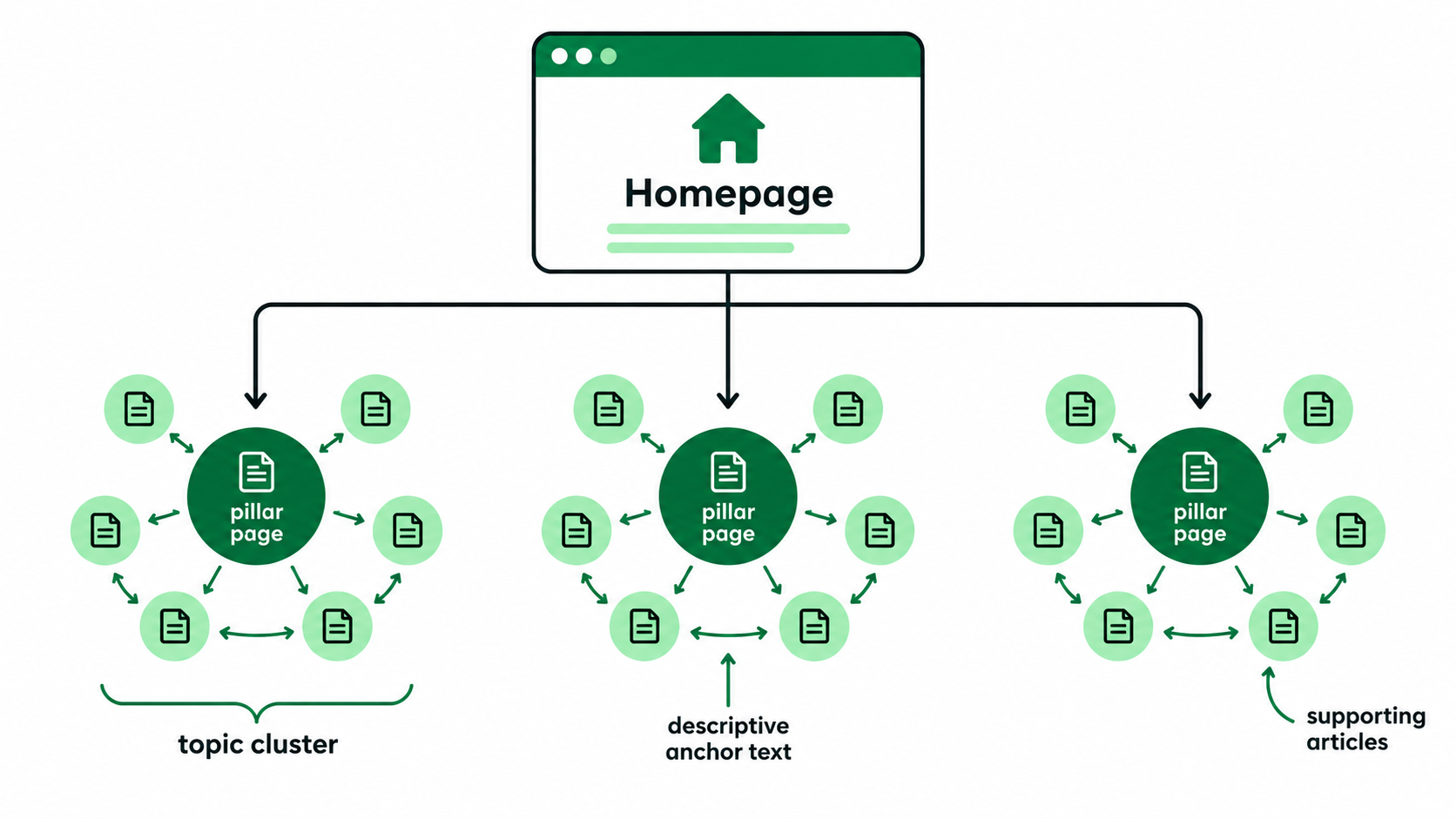
A useful blog shouldn’t feel like an isolated page. Readers often have follow-up questions, and related content can help them explore those questions without starting another search. Thoughtful internal linking also helps search engines discover pages and understand how subjects connect across a website.
- Link to Supporting Articles: If a section introduces something that requires explanation, link to a related resource. For instance, a blog article about website performance could point to an in-depth guide about Core Web Vitals. The main article can stay focused, and interested readers have a useful place to go next.
- Use Descriptive Anchor Text: The words used for a link should explain what readers will find. For example, “website migration checklist” is more useful than “click here.” Descriptive anchor text makes navigation clearer and helps establish the relationship between pages. Keep the wording natural within the surrounding sentence.
- Avoid Excessive Internal Linking: Not every mention of a service or keyword, or related concept, needs to be linked. Too many links can distract readers and make paragraphs harder to follow. Choose links that add real value. Linking the same pages over again isn’t often as useful as a few good links.
- Build Topic Clusters Naturally: Some topics are better served by a series of linked articles than one huge guide. A technical SEO company may have separate resources for indexing, redirects, site architecture, and page performance. These articles can link to a broader technical SEO guide. The end result is a collection of useful resources, each answering a different question.
Use Structured Data Properly, Not as an AI Shortcut
Structured data helps search engines understand certain information on a webpage through machine-readable markup. It can also help eligibility for some search features when the page is eligible for such. However, Google doesn’t need special AI-focused schema for AI Overviews or AI Mode.
1. Use Schema That Matches the Page
Choose markup based on what the page actually contains.
Relevant examples may include:
- Article: For suitable editorial or article content.
- Organization: For information about an organization.
- Product: For eligible product information.
- Local Business: For relevant local business details.
- Video: For pages containing suitable video content.
Each type has its own properties and requirements. Use Google’s documentation to determine which markup is appropriate.
2. Keep Structured Data Consistent With Visible Content
The markup should convey information that is visible for visitors. e.g., a product’s marked-up price should match the price shown on the page. Incorrect or misleading structured data can be problematic. Review the markup whenever important page information changes.
3. Do Not Add Markup Solely to Chase AI Citations
Adding extra schema doesn’t guarantee that an AI system will reference your article. There is no universal AI citation mark that ensures inclusion into the answers generated. Use structured data because it accurately describes relevant content, not because someone promises it will unlock special AI visibility.
4. Validate the Markup
Test for errors and eligibility issues once structured data is implemented. Verify if your rich result markup is supported. Use Google’s Rich Results Test. Tools for schema validation may help identify syntax problems. Remember that valid markup doesn’t guarantee a particular search appearance.
Optimize Images and Multimedia as Part of the Article
Search experiences increasingly involve more than written text. People use images, video, and visual search to discover products, learn about processes, and find information.
It also notes Google’s September 2026 expansion of Search Console reporting for multimodal searches, noting the importance of visual discovery. Useful image optimization should improve the article itself rather than simply add more media.
1. Use Original Images Where Possible
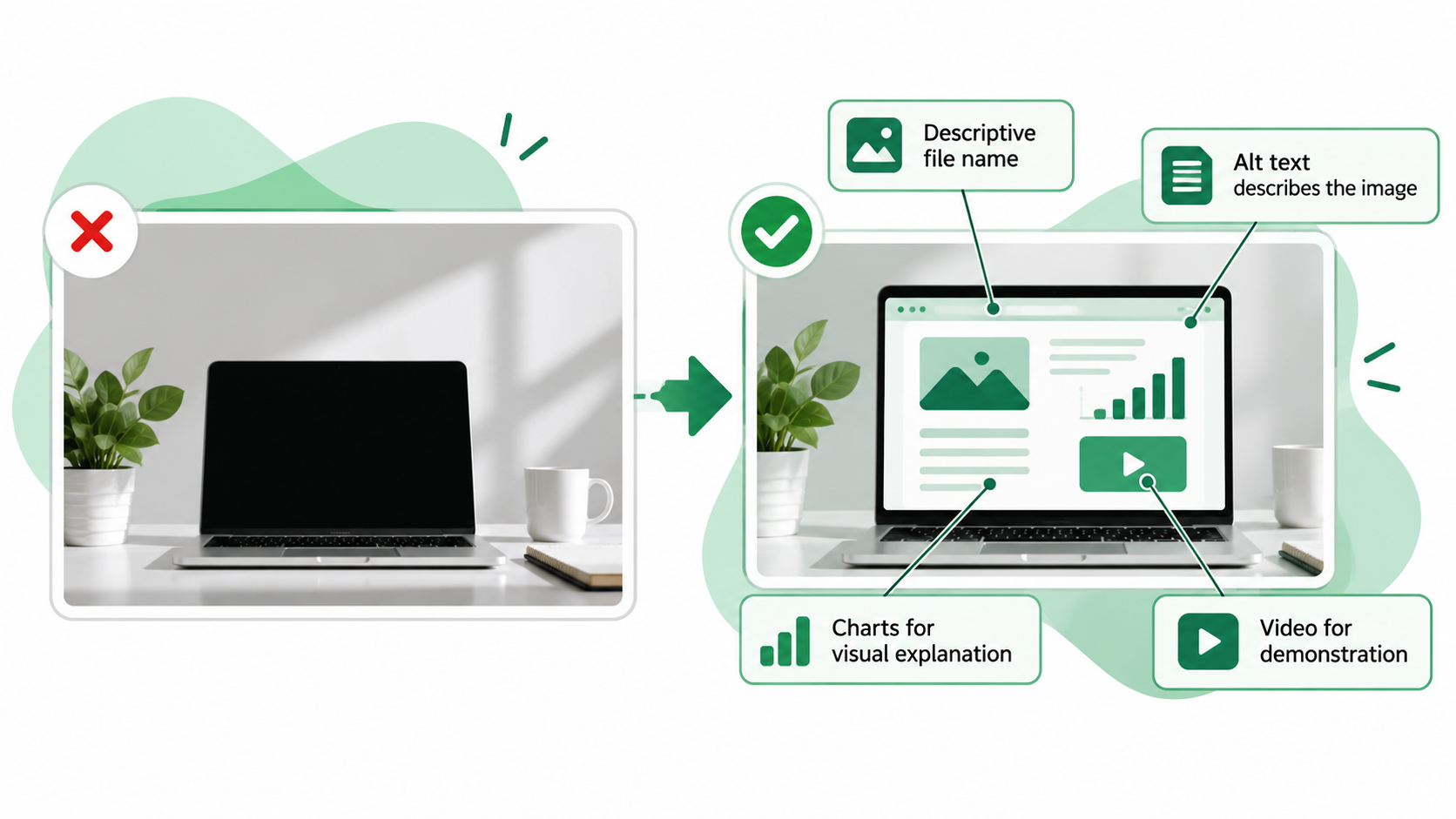
Original images can help explain information that generic stock photos cannot. A contractor might share photographs of completed work. A software company could use screenshots of a feature. A business publishing research might create its own charts. Authentic visuals can provide context and make the content more distinctive.
2. Add Helpful Alt Text
Alt text should describe the meaningful content of an image, particularly for those using screen readers. For instance, a screenshot of a report on website speed could include alt text describing the report and relevant details. Don’t jam keywords into image descriptions. What makes a person understand the visual?
3. Use Charts When Data Needs Visual Explanation
Charts help find patterns. For example, you might have a line chart showing how organic traffic has changed over a few months. A bar chart could compare volumes of inquiry by channel. Here are the figures with clear labels explaining what the numbers represent. A chart without context can be just as confusing as a long paragraph of numbers.
4. Add Video When Demonstration Is More Useful Than Text
Some processes are easier to understand when people can watch them. A software tutorial, equipment demonstration, or repair walkthrough video could be a useful medium. Provide relevant written information to support the video so readers can get the gist. The goal is to make learning easier, not force everyone to watch a recording.
5. Avoid Decorative Media That Adds No Understanding
Images shouldn’t be added simply because an article looks too text-heavy. An unrelated stock photo between every section can interrupt the reading experience. Choose visuals that explain, demonstrate, compare, or provide meaningful context. Useful multimedia supports the article without distracting from its purpose.
Keep the Human Voice in the Writing
One of the biggest risks in AI content optimization is making every article sound the same. Writers may become so focused on clarity and formatting that they remove the personality that makes content enjoyable. You can write clearly for search systems without losing the natural rhythm of human communication.
1. Vary Sentence Length
Natural writing doesn’t follow one fixed pattern. Some ideas are best explained in short sentences. Some need more space. Varying sentence lengths gives paragraphs flow. For example, a short statement can introduce a problem, and then a longer explanation of why it is important. The change has to be organic, not a formula.
2. Use Conversational Transitions Where Appropriate
Transitions help readers understand how ideas connect. Phrases such as “For example,” “In practice,” or “Consider what happens when…” can make explanations feel more natural. But don’t force a transition into every paragraph. Use them when they genuinely help move the discussion forward.
3. Include Judgment
Readers often want more than a list of facts. They want to understand which considerations matter most. For example, instead of listing ten ways to improve a landing page without prioritizing them, explain why fixing a broken inquiry form should come before changing button colors. That judgment makes the advice more practical.
4. Use Realistic Examples
Examples help readers apply an explanation to everyday situations. The divergence in search intent is more clear when you compare a person searching for a service versus a person ready to book it. Pick scenarios that mirror the audience’s real-life challenges. Don’t give extreme examples that make the advice seem impractical.
5. Do Not Repeat Keywords Mechanically
Keywords should fit the discussion. Repeating the same phrase in every paragraph can make an article uncomfortable to read. For example, blog content for AI search should still sound like something a person would naturally write. Use the main terminology where it’s relevant, then explain the ideas in normal language.
6. Let the Brand Sound like Itself
Different businesses communicate in different ways. A law firm may require a measured, professional tone. A creative agency would likely use more conversational language. AI-readiness should not erase those differences. Keep the personality of the brand, but make explanations clear, accurate, and useful.
Writing Reminder: If an article sounds awkward when read aloud, review the sentence structure. Repeated openings, forced keywords, and identical paragraph lengths often make writing feel mechanical even when the information is correct.
Avoid Writing Every Blog Like a Definition Page
The articles don’t have to be of the same structure. Some topics are best explained simply; others benefit from comparison, analysis, case studies, or detailed instruction. Choosing the right format is part of writing useful content.
1. Match the Format to the Topic
A comparison article could use a table showing important differences. Perhaps a technical troubleshooting guide should have numbered steps. A case study might be more useful as a story about the problem, the approach, and the outcome.
Other topics may call for analysis, expert opinion, or practical examples. Let the reader’s needs determine the format rather than applying one template to every article.
2. Let Complexity Determine Depth
A simple question doesn’t always need a 3,000-word answer. Likewise, a complicated subject shouldn’t be reduced to a few sentences merely to make it easier to scan. For example, explaining what a meta description is may take only a short section. A detailed website migration guide needs considerably more information. The right length is the amount needed to answer the question properly.
3. Do Not Add FAQs Unless They Add Value
FAQ sections can be helpful if your readers have related questions that weren’t addressed in the main article. Adding five or ten more questions that simply restate the content of a section creates superfluous content. Ask if each FAQ provides a useful distinction, clarification, or practical comment. If not, the article is probably better without it.
How to Use AI without Producing Generic AI Content
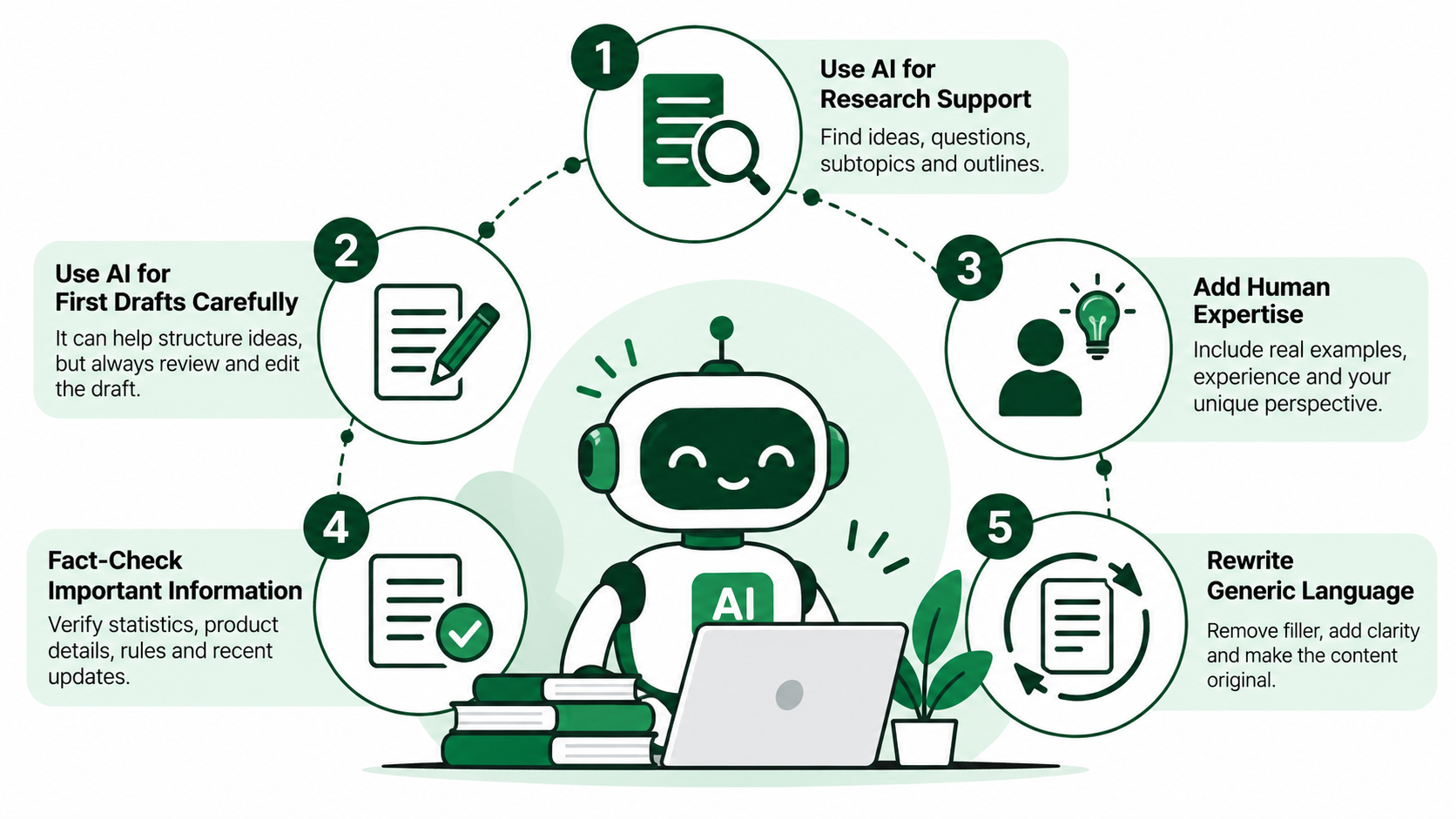
AI writing tools are perfect for research, planning, and drafting. The ability to churn out content quickly, however, can lead to businesses publishing articles without proper review or the injection of original thought. Google allows the use of AI to generate content, but creating large volumes of low-quality content mainly to manipulate search rankings may violate its spam guidelines.
1. Use AI for Research Support
AI can help you explore a topic before writing.
For example, it may suggest:
- Questions readers commonly ask.
- Related subtopics worth investigating.
- Possible article structures.
- Areas where the outline needs more detail.
Treat these suggestions as starting points. Verify important information using reliable sources and your own subject knowledge.
2. Use AI for First Drafts Carefully
A draft created by an artificial intelligence can be useful in structuring initial ideas. But it must not become the published article by default. Generated text can be factually inaccurate, include vague examples, include redundant explanations, or include bold claims not supported by evidence. Review the draft as critically as you would any other source of material.
3. Add Human Expertise before Publishing
The strongest improvements often come from information that wasn’t present in the original generated draft. Add real examples, professional observations, original research, and the brand’s perspective. For example, an article on digital marketing becomes more useful when it describes a real problem with a campaign and the thought process behind the solution. Human input should change the substance, not just a few words.
4. Fact-Check Everything Important
AI tools can also make mistakes, like making up statistics, misrepresenting features of a product, or describing outdated rules for a platform. Verify factual claims with reputable sources. Adhere to technical instructions, research findings, legal information, and recent platform updates. A slick writing style does not make wrong information right.
4. Rewrite Generic Language
Sometimes, AI-generated drafts resort to predictable language and transitions. They might also spend several paragraphs on something that could be said more directly. Cut out unnecessary filler. Vary sentence structure. Replace vague claims with specific clarifications. The final piece should read like it was written by someone who knows the subject—not like a form letter made up of generic phrases.
Common “AI Optimization” Mistakes That Make Blogs Worse
Trying too hard to make content suitable for AI can sometimes make it less useful for readers. Many so-called optimization techniques focus on formatting rather than the quality of the information.
Common mistakes include:
- Writing every heading as a question: Making the article repetitive instead of easier to navigate.
- Starting every section with a dictionary-style definition: Delaying the practical information readers want.
- Giving one-sentence answers without enough context: Leaving important details unexplained.
- Repeating keywords unnaturally: Making paragraphs awkward and difficult to read.
- Adding FAQs only for optimization: Repeating information already covered in the article.
- Creating excessive lists: Breaking connected explanations into disconnected fragments.
- Publishing generic AI summaries: Offering little that readers couldn’t find elsewhere.
- Removing brand personality: Making every article sound interchangeable.
- Using the same article structure for every topic: Ignoring differences in search intent.
- Adding unnecessary schema: Creating technical work without a clear purpose.
- Chasing arbitrary word counts: Adding filler instead of useful detail.
- Rewriting competitor articles without original value: Repeating familiar information without new insight.
- Prioritizing AI extraction over reader usefulness: Treating content as a collection of isolated answers.
An article can be technically neat and yet forgettable. Clear headings and well-structured paragraphs are valuable, but they do not replace a good explanation, original knowledge, or the reason to trust the information.
A Practical AI-Ready Blog Writing Framework
Creating useful content for both traditional and AI-powered search doesn’t require a completely new writing process. Most of the work involves making better decisions about research, structure, originality, and editing. The following framework can help you optimize content for AI search without sacrificing the reader’s experience.
Step 1 – Define the Reader’s Main Problem
Define the problem your article will help solve before you write it. Ask what you want the reader to know or do by the end. For example, if you’re writing about low website conversions, you should educate readers on what to look for and what could be causing the problem. The whole article ought to be governed by that purpose.
Step 2 – Research the Topic Properly
Use of trusted sources, official documentation, and relevant professional knowledge. Don’t take the summary of competing articles at face value. Review primary research and current guidance where available. Good research helps you locate the important details, exceptions, and claims that need supporting evidence.
Step 3 – Build a Logical Outline
Order the sections in a way that makes sense to someone learning about the subject. Then, get into explanations, comparisons, examples, and practical recommendations. Start with the key info. Don’t jump between unrelated ideas. A good outline helps you follow the article even before you start writing.
Step 4 – Answer the Core Question Early
Put useful information near the beginning. When the article is describing the reasons why a website isn’t generating leads, start out with the main causes before getting into the details of each one. Don’t make visitors scroll through a long history of digital marketing to get to the answer.
Step 5 – Add Original Value
Seek out information beyond the general advice. This may include professional experience, realistic examples, original data, and/or thoughtful analysis. Explain that those details matter and why readers should care. Originality should aid understanding, not be an end in itself to make the article different. A well-planned content marketing strategy can also help businesses maintain this quality across their published content.
Step 6 – Improve Structural Clarity
Check lists, tables, paragraphs, and headings. Ensure that each section has a specific purpose and that it follows logically from the section before it. Use lists for related things and tables for useful comparisons. If a paragraph is a more natural way of communicating an idea, don’t break each explanation into bullets.
Step 7- Add Relevant Internal Links
Link to other pages that link to useful supporting information for the article. You can bet an SEO content guide will point to resources on technical SEO, content audits, or search intent. Use descriptive anchor text and don’t overuse it. Links are an invitation to go further.
Step 8 – Fact-Check and Edit
Check key claims, figures, examples, and references. The remaining three members of the team are not professional cricketers, in contrast. Then trim for flow, tone, and redundancy. If a section is hard to read, read it out loud to see where the awkward phrasing or sentences that seem needlessly complicated are.
Step 9 – Optimize Without Overwriting the Human Voice
Make final SEO adjustments where they improve clarity or discoverability. Check titles, headings, keywords, links, and relevant technical details. But don’t rewrite natural sentences merely to insert another keyword. The final article should remain useful and comfortable to read.
What Google’s Current AI Search Guidance Really Means for Writers
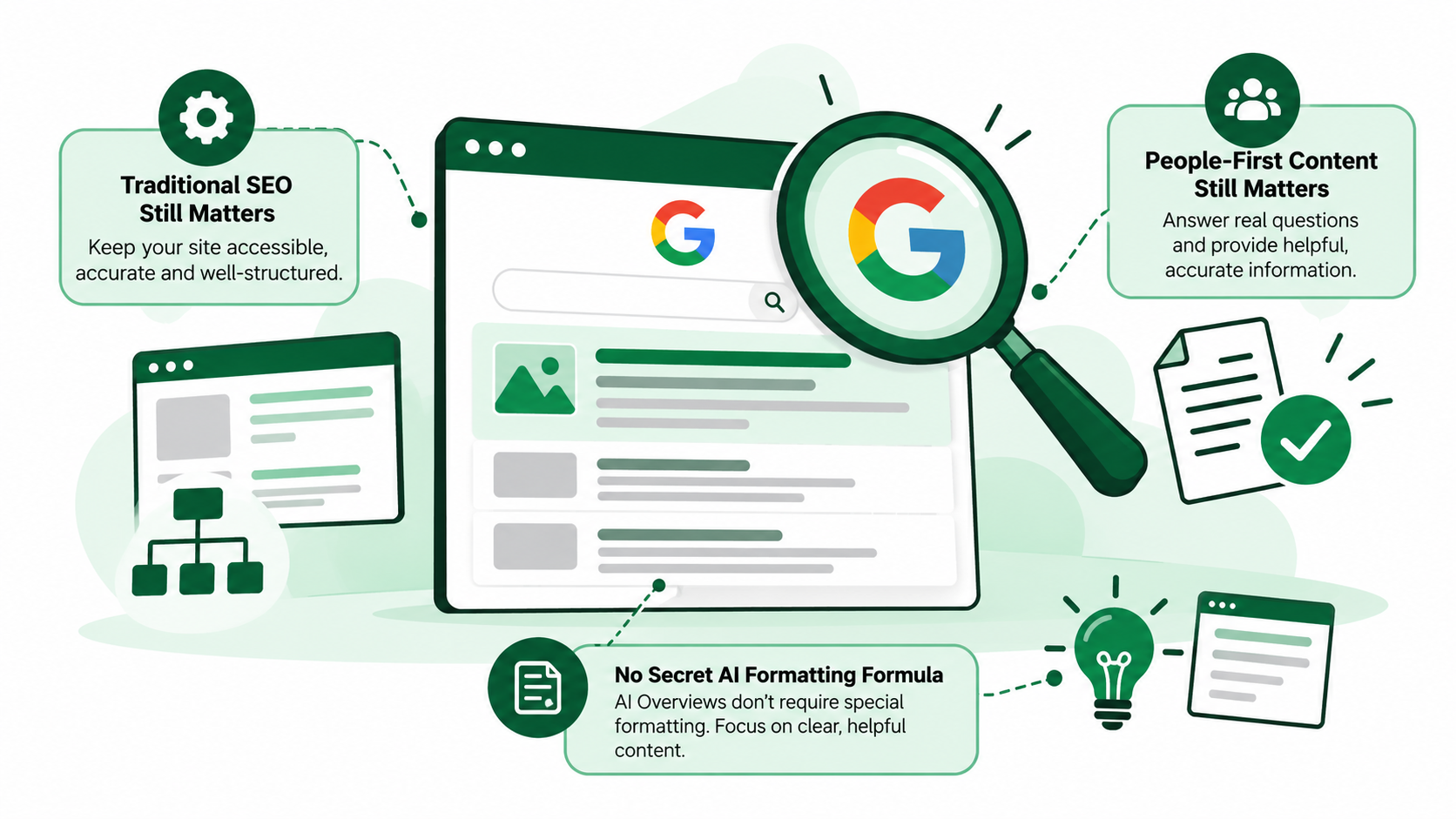
Despite the attention surrounding AI search, Google’s published guidance continues to emphasize many familiar principles. Writers don’t need to abandon good SEO practices or completely change how they communicate. The more useful approach is to understand what remains important and apply those principles consistently.
- Traditional SEO Still Matters: Google still recommends using tried-and-true SEO best practices for its generative AI search experiences. This involves making pages accessible, keeping information accurate, and publishing useful content. Technical SEO, logical site structure, and relevant internal links still count. A blog that’s difficult to discover or index won’t benefit simply because its writing has been adjusted for AI.
- People-First Content Still Matters: Google’s guidance continues to emphasize information created to help its intended audience. That means answering genuine questions, providing accurate explanations, and avoiding content produced mainly to attract search traffic. Strong people-first content considers what readers need rather than trying to satisfy an imagined algorithm.
- There Is No Secret AI Formatting Formula: Google says AI Overviews and AI Mode don’t require additional technical optimization beyond normal search eligibility. There’s no special heading pattern, schema type, or paragraph formula that guarantees inclusion. Writers should focus on providing information in a clear manner and producing content that is genuinely helpful. The main idea is simple make it easier for search engines to understand your content without losing the reasons why people want to read it.
Final Thoughts
Creating AI-ready blog posts doesn’t mean removing personality, simplifying every sentence, or turning an article into a collection of short answers. The aim is to make it easier to find useful information, easier to understand, and more trustworthy. Clear headings, direct explanations, credible sources, original examples, and relevant connections to the topic are helpful. But those enhancements should aid the writing, not dictate each sentence. Readers still appreciate thoughtfulness, natural language, and insights from real experience.
This is the kind of content that will matter most as we move into the age of AI-powered search content that has something worth reading. The answer is the first thing you should do. Say the answer clearly and then give the necessary context to make the information useful. Keep your SEO foundation strong, check important facts, and let your brand’s voice shine through. You don’t have to write for robots to make your content AI-readable. You need to write well and organize your thoughts carefully and give people a reason to trust what you publish.
Are your blogs informative but struggling to gain visibility across traditional and AI-powered search?
With eSign Web Services, you can improve content structure, strengthen topic coverage, and create more useful articles without losing your brand’s natural voice. Contact our team to build a content strategy focused on visibility and meaningful results.
Frequently Asked Questions
Question: What does it mean to make a blog post AI-ready?
Answer: Making a blog AI-ready means organizing information so readers and AI-powered search systems can understand it more easily. Clear headings, direct answers, accurate explanations, original insights, and accessible pages all help. It doesn’t require special formatting or AI-generated writing. The main goal is to publish useful, trustworthy content.
Question: Do I need to write differently for Google AI Overviews?
Answer: Google AI Overviews do not require a completely different writing style. Google’s guidance still points to tried and true SEO techniques and useful, people-first content. Emphasize clear answers to questions, details of interest, and reliable content. But don’t change all the headings or paragraphs just so it can be seen by the AI.
Question: Should every blog answer the main question immediately?
Answer: Most informational articles benefit from addressing the main question early. Readers should understand the central answer without working through several unrelated paragraphs. However, complicated subjects still need supporting explanations, examples, and exceptions. Start with useful information, then develop the topic naturally rather than reducing everything to a short response.
Question: Does structured data help content appear in AI search?
Answer: Structured data can help search engines to understand particular information on a page and help a page qualify for certain search features. However, Google doesn’t require any special AI-focused schema for AI Overviews or AI Mode. Markup doesn’t guarantee citations. Use the correct schema correctly. Follow the relevant documentation.
Question: Can AI-written blog posts rank in Google?
Answer: Yes. Google does not automatically exclude content created by AI. What matters is whether the finished article is useful, reliable, and written for readers rather than primarily to manipulate rankings. AI-generated drafts need fact-checking, editorial, and original input. Publishing a lot of low-quality content may breach spam policies.
Author Details

Ashwani Kumar Sharma
Ashwani has been actively involved in SEO services since 2005. His expertise and distinctive work approaches have made him one of the most experienced and trusted SEO experts in the industry. He is a certified SEO and Google Ads professional. He also has strong business development skills in advanced SEO, PPC, and digital marketing strategies.


